
A Kerberos (GSSAPI) bind against Active Directory works over plain LDAP on port 389. Switch the same client to ldaps:// or StartTLS, and it fails with messages that explain very little. Against hardened domain controllers this has two separate causes: LDAP channel binding, and the refusal of a SASL security layer on top of TLS. Both have a one-line fix on the client, and both are easy to misdiagnose.
Everything below was reproduced in a lab with a Samba 4.23 AD DC (dc1.ad.test), OpenLDAP 2.6 client tools and, for the second half, an OpenLDAP server (ldap1.ad.test) with a keytab from the same domain. The output is real; paths are shortened to /srv, and the diagrams use example.org. The lab is part of the krb5-testsuite.
Plain LDAP: Kerberos protects the traffic
Without TLS, a GSSAPI bind negotiates a SASL security layer: Kerberos signs and encrypts every following LDAP message. ldapwhoami shows it as the security strength factor (SSF):
$ ldapwhoami -Y GSSAPI -H ldap://dc1.ad.test
SASL/GSSAPI authentication started
SASL username: alice@AD.TEST
SASL SSF: 256
SASL data security layer installed.
u:ADTEST\alice
That layer is what satisfies the DC’s “LDAP signing required” policy. Ask for no layer on a plain connection, and the DC refuses:
$ ldapwhoami -Y GSSAPI -H ldap://dc1.ad.test -O maxssf=0
SASL/GSSAPI authentication started
ldap_sasl_interactive_bind: Strong(er) authentication required (8)
	additional info: SASL:[GSSAPI]: Sign or Seal are required.
Over TLS: the error matrix
Over LDAPS (636) and StartTLS (389 with -ZZ) the picture changes completely. These are the four combinations against the DC with its default configuration:
| Client (LDAPS or StartTLS, GSSAPI) | Answer of the DC |
|---|---|
| no channel binding | Invalid credentials (49), 80090346: LdapErr: DSID-0C090711, comment: AcceptSecurityContext error |
channel binding tls-endpoint, default SASL properties | Server is unwilling to perform (53), Sign or Seal are not allowed if TLS is used |
channel binding tls-unique | 80090346 |
channel binding tls-endpoint + maxssf=0 | bind succeeds |
$ ldapwhoami -Y GSSAPI -H ldaps://dc1.ad.test -Q
ldap_sasl_interactive_bind: Invalid credentials (49)
	additional info: 80090346: LdapErr: DSID-0C090711, comment: AcceptSecurityContext error, data 35b, v1db1

$ LDAPSASL_CBINDING=tls-endpoint ldapwhoami -Y GSSAPI -H ldaps://dc1.ad.test -Q
ldap_sasl_interactive_bind: Server is unwilling to perform (53)
	additional info: SASL:[GSSAPI]: Sign or Seal are not allowed if TLS is used

$ LDAPSASL_CBINDING=tls-endpoint ldapwhoami -Y GSSAPI -H ldaps://dc1.ad.test -O maxssf=0
SASL/GSSAPI authentication started
SASL username: alice@AD.TEST
SASL SSF: 0
u:ADTEST\alice
StartTLS behaves exactly the same way: without channel binding 80090346, with tls-endpoint and maxssf=0 the bind succeeds. Note the last output: SASL SSF: 0. The connection is protected by TLS, not by Kerberos.
0x80090346 is the Windows status SEC_E_BAD_BINDINGS, which Samba reproduces. The “Sign or Seal” wording is Samba’s; a Windows DC words that refusal differently, so look at the LDAP result code and the data code rather than the text.
What channel binding does
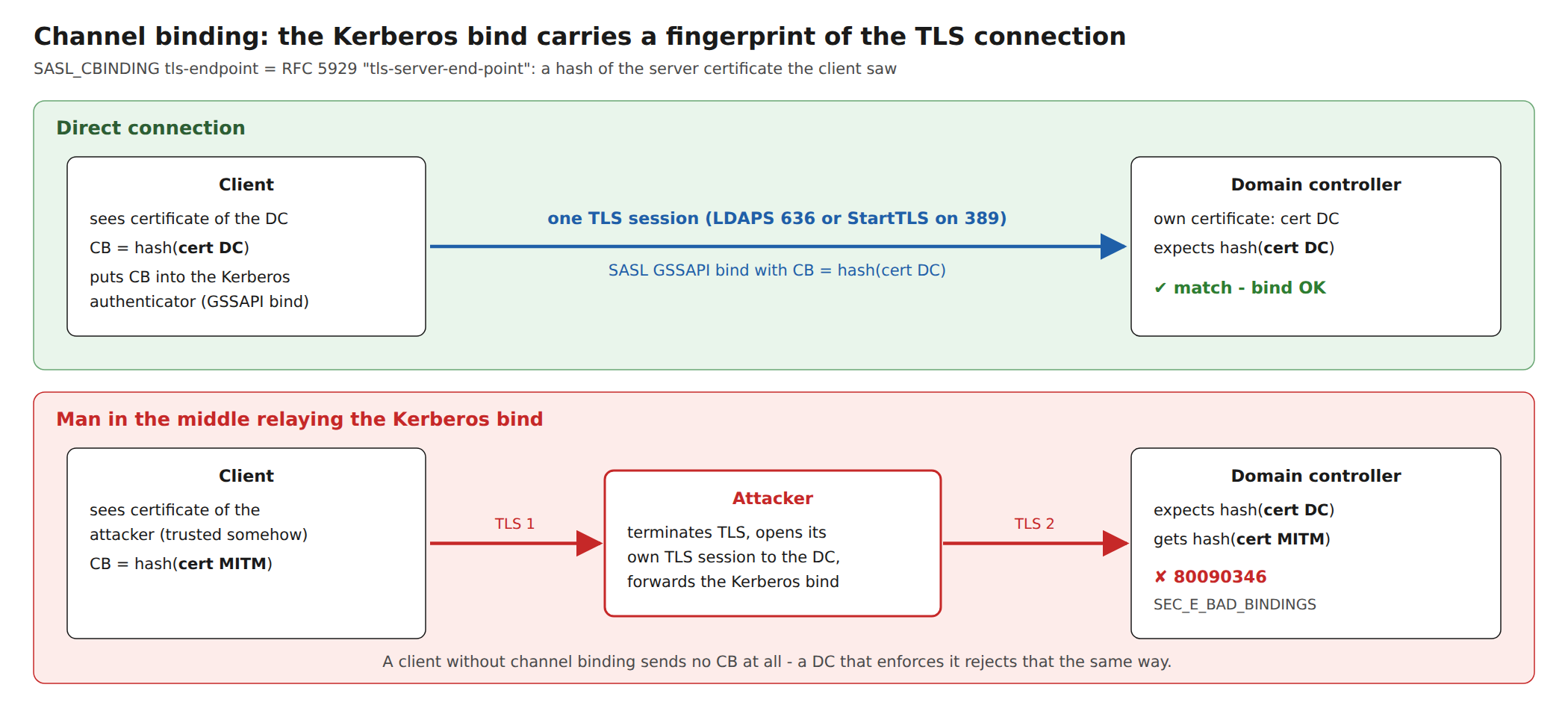
Without channel binding, the Kerberos authentication and the TLS connection are independent of each other. Someone who terminates the client’s TLS connection and opens a second one to the DC could forward the Kerberos bind and end up with an authenticated LDAP session. With channel binding, the client puts a value derived from its TLS connection into the Kerberos authenticator, and the DC compares it with the TLS connection it sees itself.
OpenLDAP’s tls-endpoint is tls-server-end-point from RFC 5929: a hash of the server certificate. Both sides can compute it, and it differs as soon as somebody else’s certificate is in between. The older tls-unique binding is derived from the TLS handshake and does not exist in TLS 1.3, which is why it fails against current servers. A client that sends no channel binding at all is rejected the same way as a relayed one.
Why maxssf=0
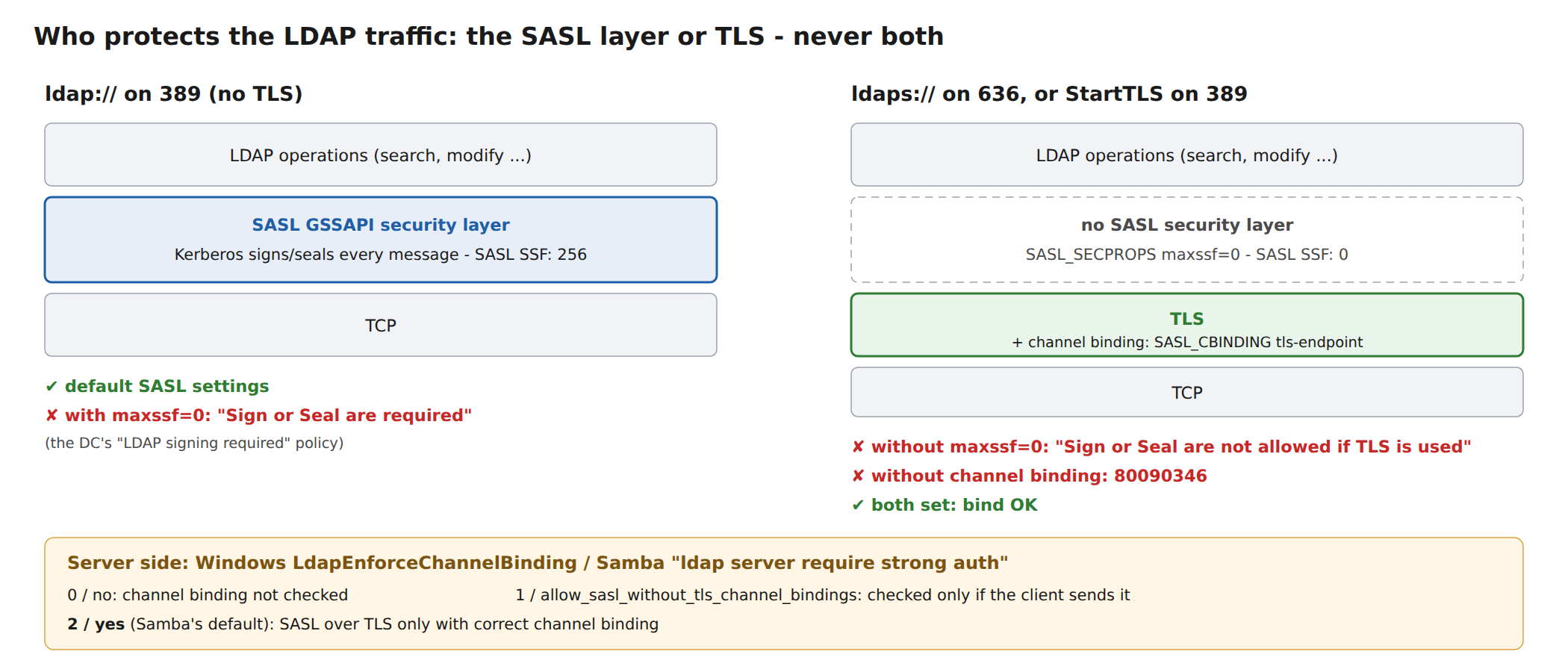
By default, Cyrus SASL negotiates the strongest security layer it can get, also over TLS. Active Directory refuses that combination: TLS already protects the connection, and wrapping every LDAP message in Kerberos on top of it is not allowed. The client has to ask for no SASL layer at all, which in Cyrus SASL terms is a maximum security strength factor of 0. That’s the second setting.
The server side
On Windows, enforcement is controlled by the registry value LdapEnforceChannelBinding under HKLM\SYSTEM\CurrentControlSet\Services\NTDS\Parameters; Microsoft’s advisory ADV190023 describes the rollout of LDAP channel binding and LDAP signing. Samba’s equivalent is ldap server require strong auth, and its manual page maps the values one to one:
Samba ldap server require strong auth | Windows LdapEnforceChannelBinding | SASL over TLS |
|---|---|---|
no | 0 | allowed, channel binding not checked; plain LDAP also allows unsigned binds |
allow_sasl_without_tls_channel_bindings | 1 | allowed without sign/seal; missing channel bindings are ignored |
yes (Samba’s default) | 2 | only with correct channel bindings |
With the DC set to the middle value, a client without channel binding gets in again, but only without a SASL layer:
# DC: ldap server require strong auth = allow_sasl_without_tls_channel_bindings
$ ldapwhoami -Y GSSAPI -H ldaps://dc1.ad.test -Q -O maxssf=0
u:ADTEST\alice

$ ldapwhoami -Y GSSAPI -H ldaps://dc1.ad.test -Q
ldap_sasl_interactive_bind: Server is unwilling to perform (53)
	additional info: SASL:[GSSAPI]: Sign or Seal are not allowed if TLS is used
Relaxing the server is a stopgap, not a fix. Configure the clients first, then enforce on the DCs. Check what your Windows DCs are actually set to rather than assuming a default.
The client configuration
For OpenLDAP’s libldap, which ldapsearch, ldapwhoami and many applications use, both settings go into ldap.conf (or ~/.ldaprc):
# /etc/ldap/ldap.conf
URI             ldaps://dc1.ad.test
TLS_CACERT      /srv/samba/private/tls/ca.pem
SASL_MECH       GSSAPI
SASL_CBINDING   tls-endpoint
SASL_SECPROPS   maxssf=0

$ ldapwhoami -Q
u:ADTEST\alice
For a quick test without touching the configuration, LDAPSASL_CBINDING=tls-endpoint and -O maxssf=0 do the same, as in the outputs above. The lab used OpenLDAP 2.6; older versions may not know SASL_CBINDING. Other LDAP stacks (sssd, Java, Python libraries, Samba’s own tools) have their own options. Test every client you have before you enforce channel binding on the DCs.
The other direction: OpenLDAP accepting AD tickets
A Linux LDAP server (slapd) with a keytab from AD is a common setup too. The Kerberos part is the same as for any service: a keytab with ldap/<fqdn> that slapd can read, plus sasl-host and sasl-realm. Two traps are specific to it.
Trap 1: authz-regexp without the realm
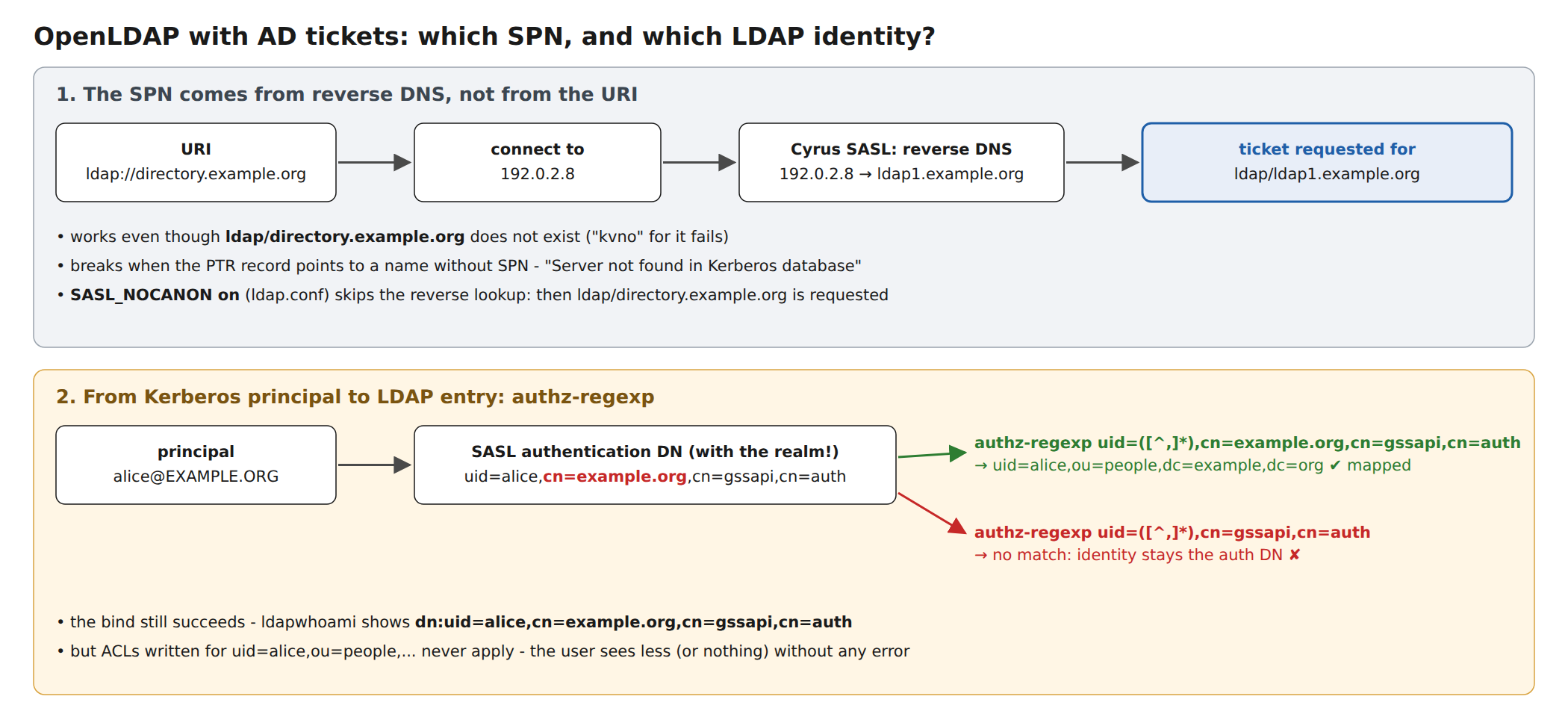
After a successful GSSAPI bind, slapd turns the principal into an authentication DN and maps it to a directory entry with authz-regexp. With Cyrus SASL that DN contains the realm. A rule written without it does not match. The bind still succeeds, so nothing looks wrong:
# slapd.conf
authz-regexp uid=([^,]*),cn=gssapi,cn=auth uid=$1,ou=people,dc=ad,dc=test

$ ldapwhoami -Y GSSAPI -H ldap://ldap1.ad.test -Q
dn:uid=alice,cn=ad.test,cn=gssapi,cn=auth
The user is authenticated but not mapped to an entry, so none of the ACLs written for uid=alice,ou=people,... apply. Depending on the ACLs she sees less, or nothing, without any error. With the realm in the pattern:
# slapd.conf
authz-regexp uid=([^,]*),cn=ad.test,cn=gssapi,cn=auth uid=$1,ou=people,dc=ad,dc=test

$ ldapwhoami -Y GSSAPI -H ldap://ldap1.ad.test -Q
dn:uid=alice,ou=people,dc=ad,dc=test
Trap 2: the SPN comes from reverse DNS
The OpenLDAP client library, via Cyrus SASL, does not request the SPN for the host name in the URI. It resolves the server’s address back to a name and requests the ticket for that. In the lab, directory.ad.test is an alias with the same address as ldap1.ad.test, and there is no SPN for the alias:
$ getent hosts directory.ad.test; getent hosts 127.0.0.8
127.0.0.8       directory.ad.test
127.0.0.8       ldap1.ad.test ldap1

$ kvno ldap/directory.ad.test
kvno: Server not found in Kerberos database while getting credentials for ldap/directory.ad.test@AD.TEST

$ ldapwhoami -Y GSSAPI -H ldap://directory.ad.test -Q
dn:uid=alice,ou=people,dc=ad,dc=test

$ klist | grep ldap/
11/15/26 16:50:12  11/16/26 02:50:12  ldap/ldap1.ad.test@AD.TEST

$ LDAPSASL_NOCANON=on ldapwhoami -Y GSSAPI -H ldap://directory.ad.test -Q
ldap_sasl_interactive_bind: Local error (-2)
	additional info: SASL(-1): generic failure: GSSAPI Error: Unspecified GSS failure.  Minor code may provide more information (Server not found in Kerberos database)
The bind via the alias works even though kvno for the alias fails: the ticket was requested for ldap/ldap1.ad.test. Turn this around and you have the real-world failure: if the PTR record points to a name that has no SPN (an old host name, a load balancer, a generic name of the hosting provider), the bind fails with Server not found in Kerberos database, while kvno ldap/<name in the URI> works fine. SASL_NOCANON on in ldap.conf switches the reverse lookup off and is a quick way to confirm the diagnosis. The proper fix is a PTR record that matches, or an SPN for the name it returns.
Testing it
ldapwhoami with the options above is the quickest test, and the SSF line tells you which layer protects the connection. The krb5-testsuite runs the same binds with options per service (cbinding, sasl_secprops, starttls, nocanon). It maps 80090346 and Sign or Seal are not allowed to the missing setting, warns when the application asks for a different SPN than the plain Kerberos lookup, and warns when a bind succeeds but the identity stayed an unmapped cn=gssapi,cn=auth DN.
Summary
- Plain LDAP with GSSAPI: Kerberos signs and seals (SSF 256); the DC requires that.
- LDAPS or StartTLS with GSSAPI against a hardened DC:
SASL_CBINDING tls-endpointandSASL_SECPROPS maxssf=0.tls-uniquedoes not work with TLS 1.3. - Server side:
LdapEnforceChannelBindingon Windows,ldap server require strong authon Samba (defaultyes, i.e. enforced). Configure the clients before you enforce. - OpenLDAP with AD tickets: include
cn=<realm>inauthz-regexp, and remember that the SPN comes from the PTR record, not from the URI.