
A user has a valid TGT, kvno fetches a service ticket without complaint, and the server still refuses. Postfix answers 535 5.7.8 Error: authentication failed: (reason unavailable), Apache returns 401, sshd asks for a password. In almost every such case the client side is fine: the server cannot decrypt the ticket, because its keytab does not hold the key the KDC used.
I ran into this while building a Kerberos test suite with a Samba Active Directory lab. Every trap below was reproduced in that lab, and the output shown is real: realm AD.TEST, an Apache with mod_auth_gssapi on www1.ad.test using the service account svc-www, and Dovecot plus Postfix on mail1.ad.test with the computer account MAIL1$. Keytab paths are shortened to /srv. The diagrams use example.org.
What has to match
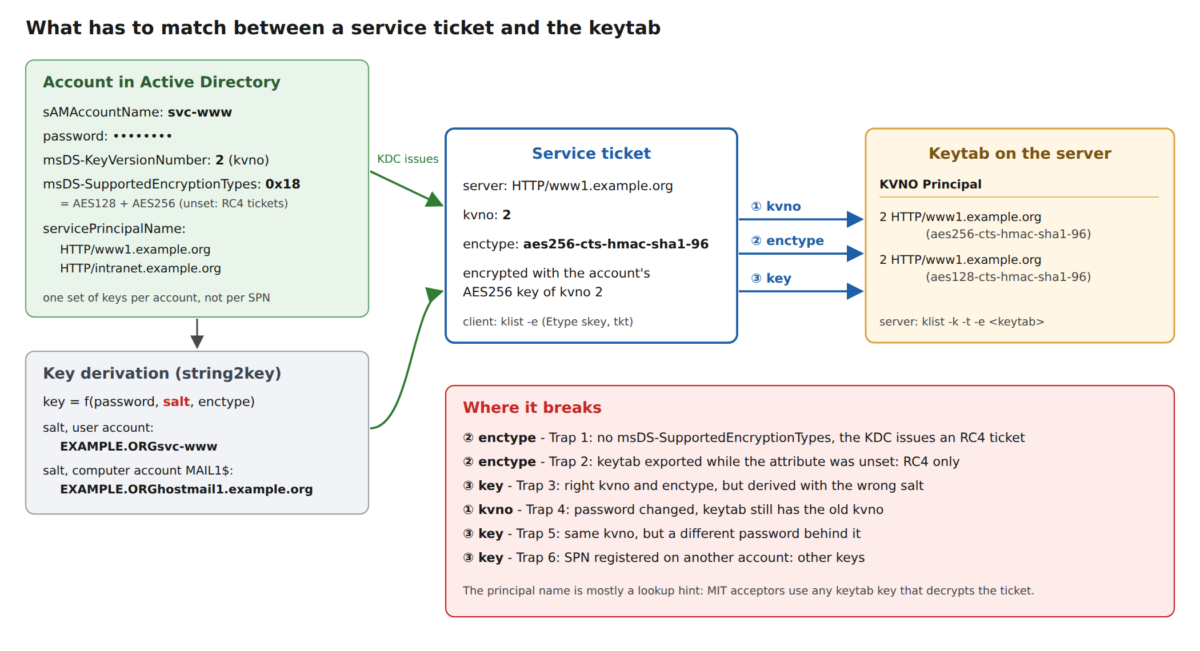
The KDC encrypts a service ticket with a long-term key of the account that owns the SPN. The server must find exactly that key in its keytab. Three things have to match: the kvno (key version number, increased with every password change), the encryption type chosen by the KDC, and the key itself, which is derived from the password and a salt.
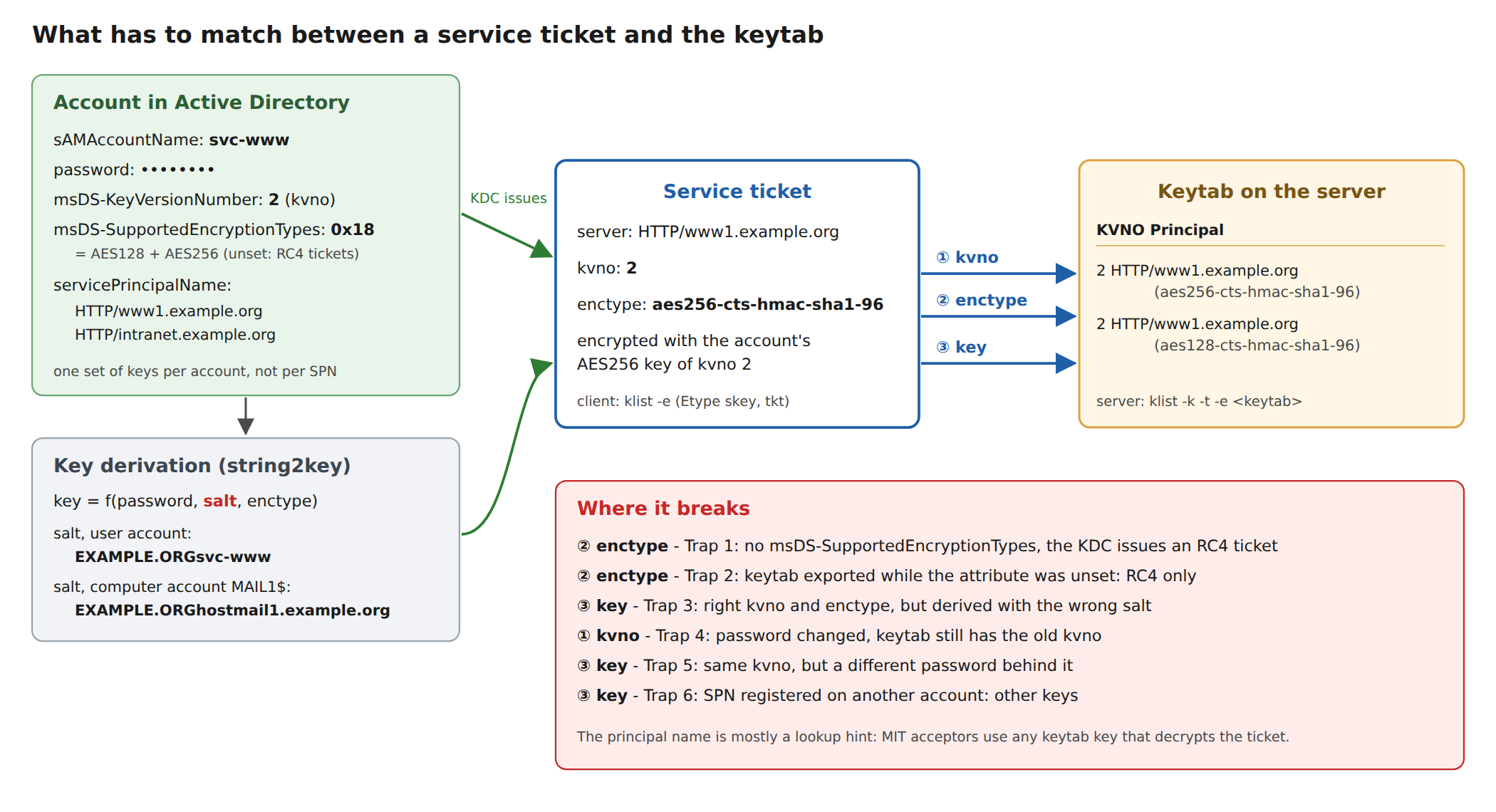
This is what the healthy state looks like. The ticket has kvno 2 and AES256, the keytab has an AES256 key with kvno 2, and kvno -k proves that the key really decrypts a fresh ticket:
$ kvno HTTP/www1.ad.test
HTTP/www1.ad.test@AD.TEST: kvno = 2

$ klist -e | grep -A1 HTTP/www1
11/15/26 16:40:07  11/16/26 02:40:07  HTTP/www1.ad.test@AD.TEST
	renew until 11/16/26 16:40:07, Etype (skey, tkt): aes256-cts-hmac-sha1-96, aes256-cts-hmac-sha1-96

$ klist -k -t -e /srv/www1.keytab
KVNO Timestamp         Principal
---- ----------------- --------------------------------------------------------
   2 11/15/26 16:39:18 HTTP/www1.ad.test@AD.TEST (aes256-cts-hmac-sha1-96)
   2 11/15/26 16:39:18 HTTP/www1.ad.test@AD.TEST (aes128-cts-hmac-sha1-96)

$ kvno -k /srv/www1.keytab HTTP/www1.ad.test
HTTP/www1.ad.test@AD.TEST: kvno = 2, keytab entry valid
One warning before the traps: when the key does not fit, MIT’s kvno -k reports Wrong principal in request for every single one of them, whatever the actual cause. Don’t take that message literally. The server’s own log is much more precise; there is a table further down.
Trap 1: AD issues RC4 tickets
For an account without msDS-SupportedEncryptionTypes, Active Directory and Samba AD encrypt service tickets with RC4. In the lab I removed the attribute from svc-www. The kvno stays the same, only the ticket enctype changes, and the AES-only keytab no longer fits:
$ klist -e | grep -A1 HTTP/www1
11/15/26 16:40:07  11/16/26 02:40:07  HTTP/www1.ad.test@AD.TEST
	renew until 11/16/26 16:40:07, Etype (skey, tkt): aes256-cts-hmac-sha1-96, DEPRECATED:arcfour-hmac

$ kvno -k /srv/www1.keytab HTTP/www1.ad.test
HTTP/www1.ad.test@AD.TEST: kvno = 2, keytab entry invalid
kvno: Wrong principal in request while decrypting ticket for HTTP/www1.ad.test@AD.TEST

# Apache error.log
[auth_gssapi:error] GSS ERROR In Negotiate Auth: gss_accept_sec_context() failed: [Unspecified GSS failure.
  Minor code may provide more information (Request ticket server HTTP/www1.ad.test@AD.TEST kvno 2
  found in keytab but not with enctype rc4-hmac)]
The session key is still AES256; only the ticket itself (tkt in klist’s output) is RC4. Watch the second enctype. The fix is to set msDS-SupportedEncryptionTypes to 0x18 (AES128 + AES256) on the account. Windows and adcli/sssd joins do that for computer accounts; service accounts created by hand usually don’t have it. If the password predates AES support in the domain, reset it once so AES keys exist.
Trap 2: the RC4-only keytab export
This is the one behind 535 5.7.8 ... (reason unavailable). samba-tool domain exportkeytab --principal=<SPN> exports only the encryption types listed in the account’s msDS-SupportedEncryptionTypes. While the attribute is unset, that means RC4 only. In the lab: export while the attribute is missing, then enable AES on the account:
$ klist -k -t -e /srv/mail1.keytab
KVNO Timestamp         Principal
---- ----------------- --------------------------------------------------------
   2 11/15/26 16:40:09 imap/mail1.ad.test@AD.TEST (DEPRECATED:arcfour-hmac)
   2 11/15/26 16:40:09 smtp/mail1.ad.test@AD.TEST (DEPRECATED:arcfour-hmac)

$ klist -e | grep -A1 smtp/mail1
11/15/26 16:40:10  11/16/26 02:40:10  smtp/mail1.ad.test@AD.TEST
	renew until 11/16/26 16:40:10, Etype (skey, tkt): aes256-cts-hmac-sha1-96, aes256-cts-hmac-sha1-96

# SMTP AUTH GSSAPI against Postfix (SASL via Dovecot)
535 5.7.8 Error: authentication failed: (reason unavailable)

# Postfix maillog
postfix/smtpd[1244230]: warning: unknown[127.0.0.1]: SASL GSSAPI authentication failed: (reason unavailable), sasl_username=(unavailable)

# Dovecot log
auth(?,127.0.0.1,sasl:gssapi): Info: sasl(gssapi): While processing incoming data: Request ticket server
  smtp/mail1.ad.test@AD.TEST kvno 2 found in keytab but not with enctype aes256-cts
Postfix only passes on Dovecot’s failure, hence reason unavailable. Dovecot itself is precise here because the lab sets auth_gssapi_hostname to the real host name. With auth_gssapi_hostname = $ALL, a common setting, Dovecot tries every key and only logs the generic Key table entry not found. Switch to the real name while debugging. The fix: enable AES on the account first, then export the keytab again.
Trap 3: the wrong salt
AES keys are derived from the password and a salt. In AD the salt depends on the account, not on the SPN:
- user (service) accounts:
REALM+sAMAccountName, e.g.AD.TESTsvc-www - computer accounts:
REALM+host+ lower-case name without$+.+ lower-case DNS domain, e.g.AD.TESThostmail1.ad.test
MIT’s ktutil uses the salt of the principal you type unless you pass -s. For HTTP/www1.ad.test that is not the account’s salt. The result looks perfect and does not work:
ktutil:  addent -password -p HTTP/www1.ad.test@AD.TEST -k 2 -e aes256-cts-hmac-sha1-96

$ klist -k -t -e /srv/www1.keytab
   2 11/15/26 16:40:12 HTTP/www1.ad.test@AD.TEST (aes256-cts-hmac-sha1-96)
   2 11/15/26 16:40:12 HTTP/www1.ad.test@AD.TEST (aes128-cts-hmac-sha1-96)

$ kvno -k /srv/www1.keytab HTTP/www1.ad.test
HTTP/www1.ad.test@AD.TEST: kvno = 2, keytab entry invalid
kvno: Wrong principal in request while decrypting ticket for HTTP/www1.ad.test@AD.TEST

# Apache error.log
... (Request ticket server HTTP/www1.ad.test@AD.TEST kvno 2 enctype aes256-cts found in keytab but cannot decrypt ticket)
Same entries with the account’s salt, and it works:
ktutil:  addent -password -p HTTP/www1.ad.test@AD.TEST -k 2 -e aes256-cts-hmac-sha1-96 -s AD.TESTsvc-www

$ kvno -k /srv/www1.keytab HTTP/www1.ad.test
HTTP/www1.ad.test@AD.TEST: kvno = 2, keytab entry valid
Traps 4 and 5: the kvno
Trap 4: kvno drift
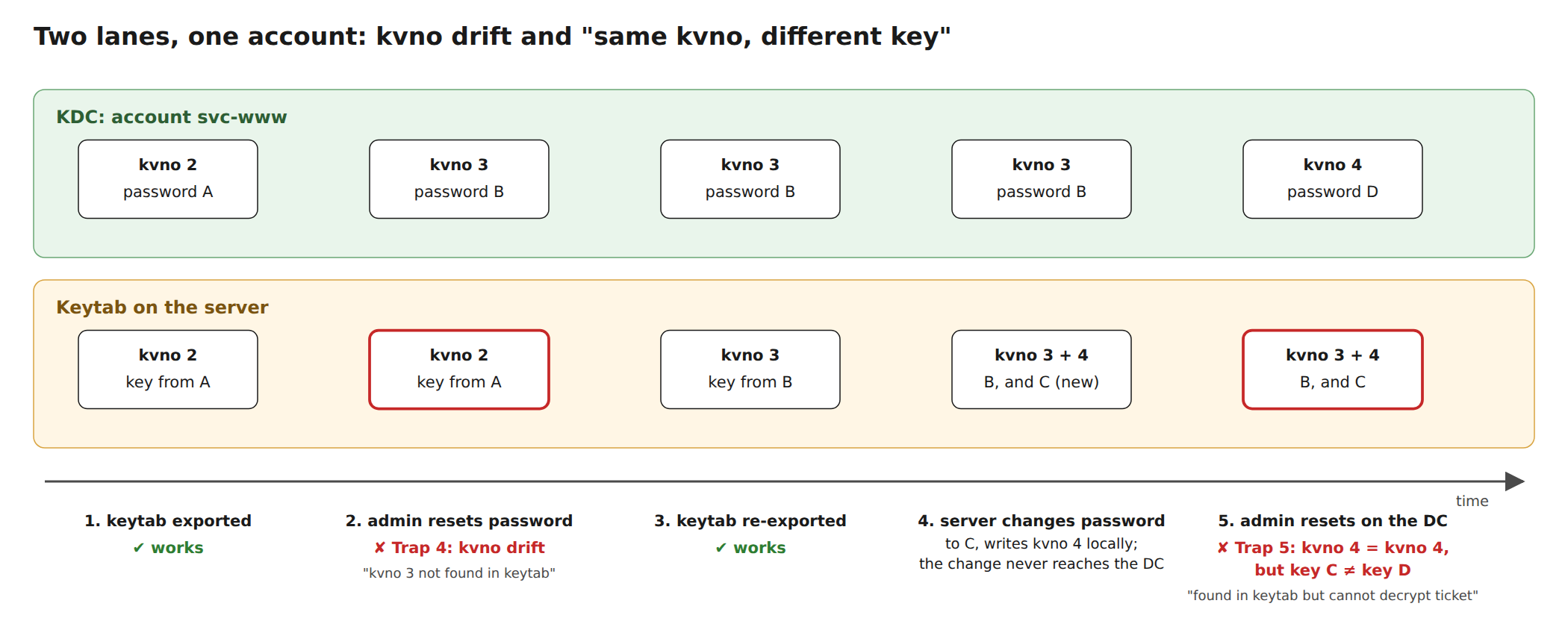
Every password change of the account increases the kvno. If nobody exports the keytab again, the server is stuck at the old one. Here an admin reset the password of svc-www:
$ kvno HTTP/www1.ad.test
HTTP/www1.ad.test@AD.TEST: kvno = 3

$ klist -k -t -e /srv/www1.keytab
   2 11/15/26 16:40:12 HTTP/www1.ad.test@AD.TEST (aes256-cts-hmac-sha1-96)
   2 11/15/26 16:40:12 HTTP/www1.ad.test@AD.TEST (aes128-cts-hmac-sha1-96)

$ curl -v --negotiate -u : http://www1.ad.test/
< HTTP/1.1 401 Unauthorized
* gss_init_sec_context() failed: Key version is not available.

# Apache error.log
... (Request ticket server HTTP/www1.ad.test@AD.TEST kvno 3 not found in keytab; keytab is likely out of date)
Note curl’s message: gss_init_sec_context() failed sounds like a client problem, but it is curl decoding the server’s error token. The server rejected the ticket. Typical causes: someone reset the service account password, the host was re-joined, or a second keytab export elsewhere (ktpass, msktutil, net ads keytab) bumped the kvno.
Trap 5: same kvno, different key
The most confusing case: the keytab has an entry with exactly the kvno and enctype of the ticket, and it still does not decrypt it. I first hit this with a Samba member server. It had already written the keys for its next machine password into the keytab, the password change did not reach the DC, and an admin then reset the computer password on the DC. Both sides ended up at the same kvno with different passwords. In the lab I reproduced it on purpose: the keytab got kvno 4 from one password, the DC got kvno 4 from another:
$ kvno HTTP/www1.ad.test
HTTP/www1.ad.test@AD.TEST: kvno = 4

$ klist -k -t -e /srv/www1.keytab
   3 11/15/26 16:40:14 HTTP/www1.ad.test@AD.TEST (aes256-cts-hmac-sha1-96)
   3 11/15/26 16:40:14 HTTP/www1.ad.test@AD.TEST (aes128-cts-hmac-sha1-96)
   4 11/15/26 16:40:14 HTTP/www1.ad.test@AD.TEST (aes256-cts-hmac-sha1-96)
   4 11/15/26 16:40:14 HTTP/www1.ad.test@AD.TEST (aes128-cts-hmac-sha1-96)

$ kvno -k /srv/www1.keytab HTTP/www1.ad.test
HTTP/www1.ad.test@AD.TEST: kvno = 4, keytab entry invalid
kvno: Wrong principal in request while decrypting ticket for HTTP/www1.ad.test@AD.TEST
Comparing kvno numbers does not help here. On the server, MIT logs the same message as for the wrong salt (found in keytab but cannot decrypt ticket). The fix is to bring both sides back to one password: re-join the host (net ads join, adcli join) or reset the account password and export the keytab again.
Trap 6: keys belong to the account, not to the SPN
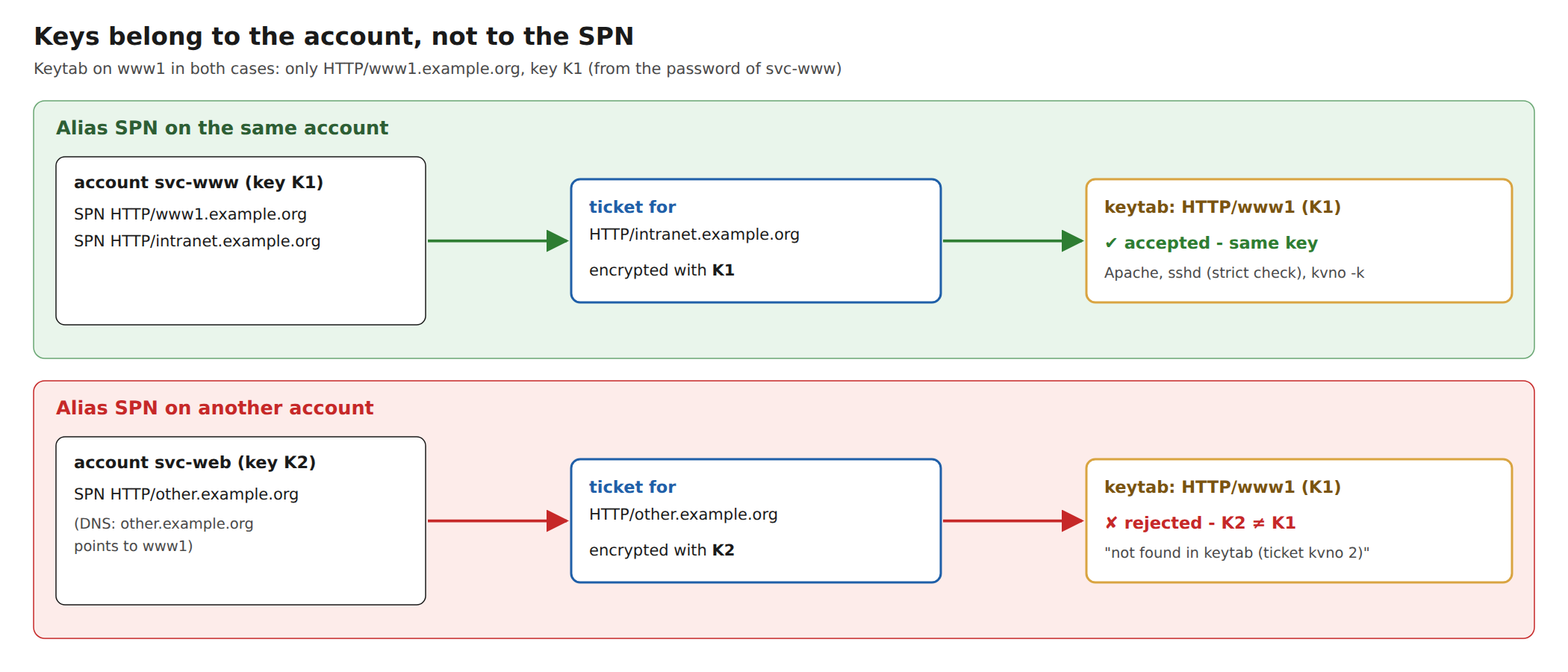
An alias name for a server needs its own SPN, e.g. HTTP/intranet.ad.test next to HTTP/www1.ad.test. If you put it on the same account, the ticket is encrypted with the same key. The keytab does not even need an entry with the alias name:
$ klist -k -t -e /srv/www1.keytab
   4 11/15/26 16:40:15 HTTP/www1.ad.test@AD.TEST (aes256-cts-hmac-sha1-96)
   4 11/15/26 16:40:15 HTTP/www1.ad.test@AD.TEST (aes128-cts-hmac-sha1-96)

$ kvno -k /srv/www1.keytab HTTP/intranet.ad.test
HTTP/intranet.ad.test@AD.TEST: kvno = 4, keytab entry valid

$ curl --negotiate -u : http://intranet.ad.test/      # HTTP 200
# Apache access.log
127.0.0.1 alice@AD.TEST "GET / HTTP/1.1" 200
I expected that to fail at least for acceptors that check the name. It doesn’t: sshd with GSSAPIStrictAcceptorCheck yes accepted a login via an alias SPN on its computer account, and so did a plain GSSAPI acceptor that explicitly acquired credentials for host@ssh1.ad.test. MIT 1.22 uses any key that decrypts the ticket. If the alias SPN is registered on another account, for example because the name was once used by a different service, the ticket is encrypted with that account’s key, and the server has no chance:
$ kvno -k /srv/www1.keytab HTTP/other.ad.test
HTTP/other.ad.test@AD.TEST: kvno = 2, keytab entry invalid
kvno: Wrong principal in request while decrypting ticket for HTTP/other.ad.test@AD.TEST

# Apache error.log
... (Request ticket server HTTP/other.ad.test@AD.TEST not found in keytab (ticket kvno 2))
Check which account holds an SPN (setspn -Q HTTP/other.example.org on Windows, samba-tool spn list <account> on Samba). Even when an alias on the same account works without its own keytab entry, add it anyway: a keytab that lists the names it is used for is easier to check, and it keeps working if the setup changes.
The server log knows more than kvno -k
MIT’s acceptor writes a precise reason into the GSS minor status, which Apache (mod_auth_gssapi), Dovecot and sshd log. In the lab, these were the messages for each trap:
| Server log message (MIT acceptor) | Trap |
|---|---|
... kvno N found in keytab but not with enctype rc4-hmac | 1: RC4 ticket |
... kvno N found in keytab but not with enctype aes256-cts | 2: RC4-only keytab |
... kvno N enctype aes256-cts found in keytab but cannot decrypt ticket | 3: wrong salt, or 5: same kvno, other key |
... kvno N not found in keytab; keytab is likely out of date | 4: kvno drift |
... <SPN> not found in keytab (ticket kvno N) | 6: SPN on another account |
Finding the cause
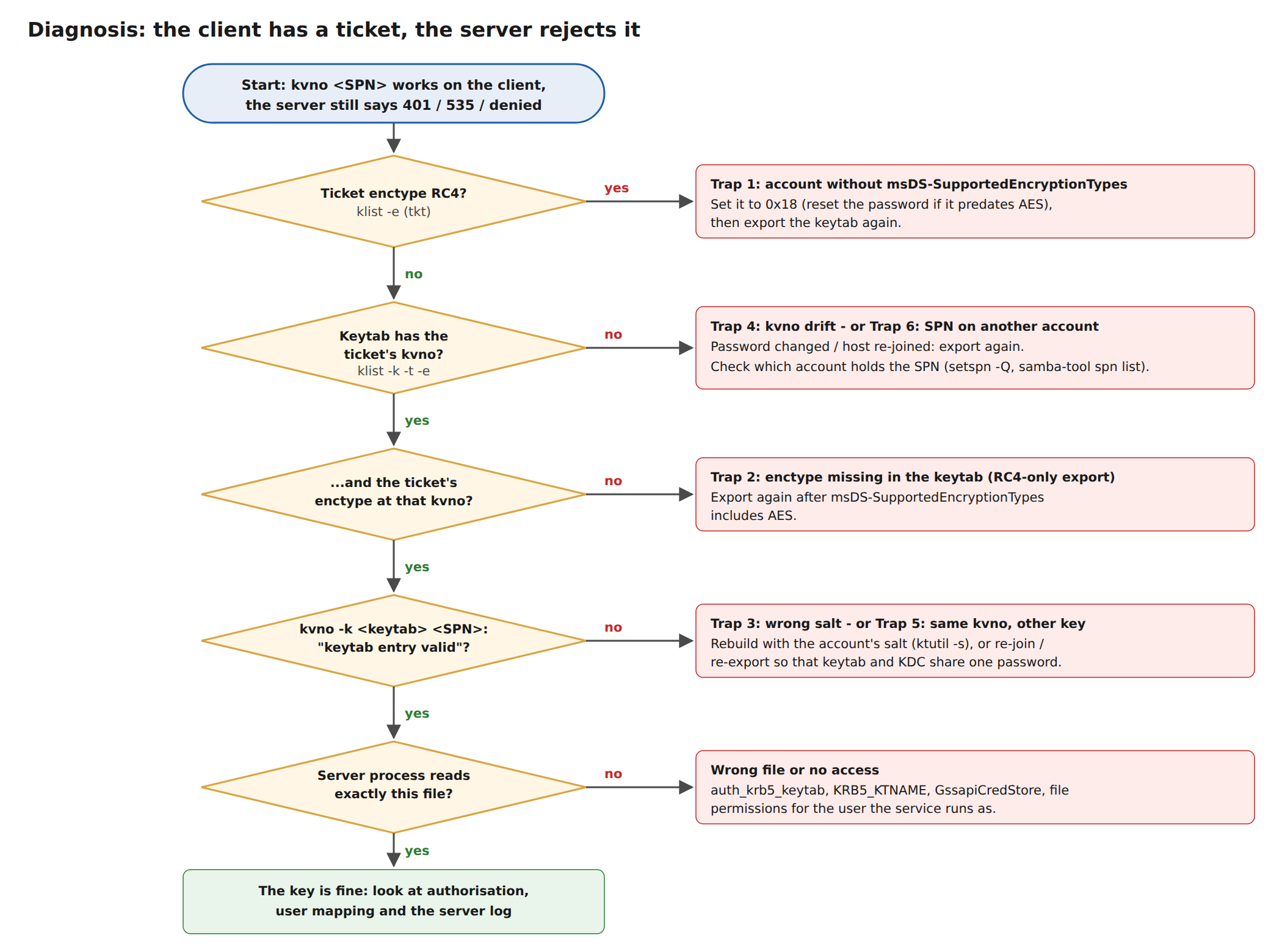
- On a client:
kvno <SPN>andklist -e. Note the kvno and the ticket enctype (the second one). - On the server:
klist -k -t -e <keytab>. Is there an entry with that kvno and enctype? - On the server, with any user’s TGT:
kvno -k <keytab> <SPN>. Only keytab entry valid proves that the key works; this is the only check that catches traps 3 and 5. - Check that the service process reads that file and is allowed to (Dovecot
auth_krb5_keytab,KRB5_KTNAME, mod_auth_gssapiGssapiCredStore, file permissions). - Read the server log; the table above tells you which trap it is.
The krb5-testsuite automates these steps. Run on the server with keytab: set for a service, it compares kvno and enctypes, runs the kvno -k test, and names the trap: RC4 tickets, missing enctypes, outdated kvno, the same-kvno case, and keys that only work because the SPN belongs to the same account.
Summary
A keytab is a copy of an account’s password, frozen at one point in time, for one salt and a few encryption types. Set msDS-SupportedEncryptionTypes before exporting, export again after every password change, use the account’s salt when you build entries yourself, and remember that keys belong to accounts, not to SPNs. When something fails, don’t trust klist -k or the generic Wrong principal message: test with kvno -k and read the server’s log.