
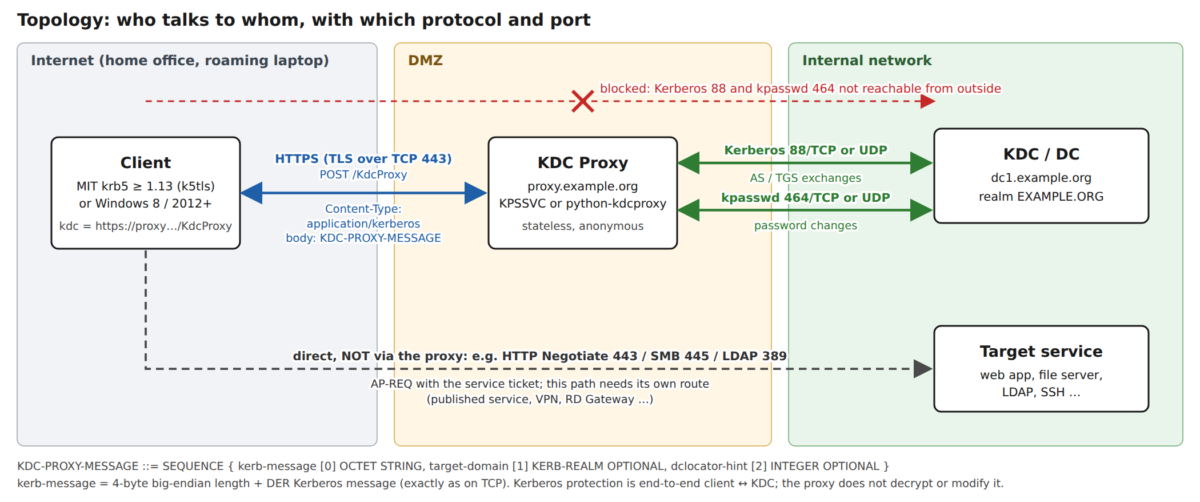
Kerberos works well inside the corporate network. Outside it, a home office, a roaming laptop or a host in the DMZ, it usually fails at the first step: the client cannot reach a KDC. A KDC proxy fixes exactly this one problem. This post explains what the proxy does, what goes over the wire, and where the problems tend to be.
The problem: port 88 is closed, port 443 is open
To get a TGT or a service ticket, a client has to talk to a KDC on port 88 (TCP or UDP). To change a password it talks to kpasswd on port 464. Domain controllers and MIT KDCs sit in the internal network, and nobody wants to publish 88 and 464 to the Internet. From outside, kinit ends with Cannot contact any KDC for realm, and Windows clients fall back to NTLM or cached credentials.
What is almost always open is HTTPS on TCP 443. The Kerberos KDC Proxy Protocol, specified by Microsoft as MS-KKDCP, uses that: the client wraps each Kerberos message in an HTTPS request to a proxy, and the proxy forwards it to a real KDC and returns the answer. MS-KKDCP only replaces the transport. The Kerberos messages are the same ones the client would send on port 88.
The big picture

How it works, step by step
1. Client configuration
MIT krb5 (1.13 and later) accepts an HTTPS URL wherever it normally expects a KDC host name:
[realms]
    EXAMPLE.ORG = {
        kdc = https://proxy.example.org/KdcProxy
        kpasswd_server = https://proxy.example.org/KdcProxy
        http_anchors = FILE:/etc/pki/ca.pem
    }
http_anchors names the CA certificates used to verify the proxy’s TLS certificate. Without it, the system trust store is used. The TLS code is a separate plugin, k5tls. On Debian and Ubuntu it is in its own package, krb5-k5tls, and is often not installed. Without it, kinit only says Cannot contact any KDC for realm. The actual cause, Could not find tls plugin module named ‘k5tls’, shows up only in the trace output (KRB5_TRACE).
Since MIT krb5 1.15, clients can also find KDCs and proxies through DNS URI records (the _kerberos.REALM URI record), where a transport of kkdcp marks a KDC proxy. You can use this instead of hard-coding the URL in every krb5.conf.
Windows clients (Windows 8 / Server 2012 and later) are configured with the Group Policy setting Specify KDC proxy servers for Kerberos clients (Computer Configuration → Administrative Templates → System → Kerberos). It maps a domain name to one or more proxy URLs.
Heimdal does not support MS-KKDCP. I checked Heimdal 7.8 (the version in current Debian and Ubuntu) and the current Heimdal master source. Heimdal only has an older, non-standard HTTP transport: kdc = http://host/ sends the Kerberos request base64-encoded in the URL of a plain GET, without TLS and without the KDC-PROXY-MESSAGE structure. A KKDCP proxy does not understand that. A kdc = https://... entry is ignored without a warning, and kinit just reports unable to reach any KDC in realm. The same applies to software that ships Heimdal internally, for example Samba builds with the embedded Heimdal libraries.
2. Client → proxy: HTTPS POST with a KDC-PROXY-MESSAGE
The client opens a TLS connection over TCP 443 to the proxy and sends an HTTP POST to the proxy path, usually /KdcProxy, with Content-Type: application/kerberos. The body is a DER-encoded ASN.1 structure defined in MS-KKDCP:
KDC-PROXY-MESSAGE ::= SEQUENCE {
    kerb-message    [0] OCTET STRING,
    target-domain   [1] KERB-REALM OPTIONAL,
    dclocator-hint  [2] INTEGER OPTIONAL
}- kerb-message carries the Kerberos message exactly as it would be sent over TCP to port 88: a 4-byte big-endian length prefix followed by the DER-encoded message. That is an AS-REQ, a TGS-REQ, or a kpasswd request.
- target-domain is the realm the message is meant for. The proxy needs it to decide which KDCs to forward to.
- dclocator-hint is an optional hint for Windows DC location and is usually not needed.
The HTTP response uses the same structure. Its kerb-message contains the KDC’s answer, again with the TCP length prefix: an AS-REP, a TGS-REP, a kpasswd reply, or a KRB-ERROR. A KRB-ERROR is still a normal Kerberos answer. HTTP-level errors (4xx/5xx) mean the proxy itself could not handle the request.
3. Proxy → KDC: plain Kerberos
The proxy unpacks kerb-message and sends it as ordinary Kerberos to a KDC of the target realm: port 88 for AS and TGS requests, port 464 for password changes, over TCP or UDP depending on the proxy’s configuration. It finds the KDCs through its own configuration or through DNS SRV records (_kerberos._tcp.EXAMPLE.ORG, _kerberos._udp.EXAMPLE.ORG, and the kpasswd equivalents). It then wraps the reply in a KDC-PROXY-MESSAGE and returns it as the HTTP response.
4. One HTTP request per Kerberos exchange
Each Kerberos exchange is exactly one HTTP request and one HTTP response. A typical kinit with pre-authentication needs two: the first AS-REQ gets a KRB-ERROR (pre-authentication required), and the second AS-REQ with the encrypted timestamp gets the AS-REP with the TGT. Every later service ticket is one more TGS round trip. MIT krb5 opens a new TLS connection for every Kerberos request. In the trace you see Terminating TCP connection to https …:443 after each answer.
5. What the proxy does not do
- It is stateless. Every request stands alone; no session is kept between the AS and TGS exchanges.
- It does not authenticate the client. In the usual setup the HTTPS endpoint is anonymous. Authentication is Kerberos’s job and happens between client and KDC.
- It does not decrypt or alter Kerberos messages. It has no keys. The protection of the Kerberos messages is end-to-end between client and KDC. TLS adds confidentiality for the parts that Kerberos sends in cleartext, such as client and service principal names and the realm.
- It only carries KDC traffic. After the client has its service ticket, it talks to the actual service (HTTP Negotiate, SMB, LDAP, SSH, …) directly. That path must be reachable separately, for example as a published service, via VPN, or via RD Gateway.
Implementations
Windows Server: KDC Proxy Server service (KPSSVC)
Windows Server includes the Kerberos Key Distribution Center Proxy Server service (KPSSVC). It listens through http.sys at https://<server>/KdcProxy and is used by Remote Desktop Gateway and DirectAccess, among others. It needs a TLS certificate bound to the URL. Its behaviour, for example whether client certificates or FAST are required, is controlled by registry settings for the service. Check these against the clients you want to support, especially non-Windows clients.
python-kdcproxy (FreeIPA and others)
kdcproxy is a small Python WSGI application, typically run under Apache with mod_wsgi. FreeIPA ships it and enables it at /KdcProxy on its servers. It reads /etc/kdcproxy.conf; a static mapping without DNS looks like this:
[global]
use_dns = false

[EXAMPLE.ORG]
kerberos = kerberos+tcp://dc1.example.org:88
kpasswd = kpasswd+tcp://dc1.example.org:464
With use_dns = true it looks up the KDCs through DNS SRV records of the requested realm instead. A request for a realm it has no mapping for, or a KDC it cannot reach, ends up as an HTTP error on the client side.
Limitations and pitfalls
- TCP/HTTPS only towards the client. There is no UDP variant. Every exchange costs a TCP and TLS handshake, and with MIT krb5 a new one per request. That adds latency, which matters on slow links and for workloads that request many service tickets.
- TLS trust must be set up. The client has to trust the proxy’s certificate (
http_anchorsor the system trust store), and the certificate must match the host name in thekdcURL. A certificate for the internal host name does not help if the URL uses the public name. - Missing k5tls plugin on Debian/Ubuntu. Without the
krb5-k5tlspackage, MIT clients fail with the generic Cannot contact any KDC for realm. OnlyKRB5_TRACEshows the missing plugin. - Client support. MIT krb5 1.13 and later, and Windows 8 / Server 2012 and later. Heimdal clients cannot use a KDC proxy (no MS-KKDCP support up to the current master; its own
http://transport is not compatible), and neither can tools that embed Heimdal, such as Samba builds with the bundled Heimdal libraries. For other stacks (Java, embedded clients) do not assume support; test each one. - Not everything goes through the proxy. MS-KKDCP carries KDC and kpasswd messages only. Remote administration such as kadmin uses its own protocol and does not go through the proxy.
- The proxy exposes the KDC to the outside. It is anonymous, so anyone who can reach it can send AS-REQs to your realm. That allows password guessing via pre-authentication, AS-REP roasting of accounts that do not require pre-authentication, user enumeration through error codes, and denial of service. Use rate limiting, account lockout policies, monitoring of KDC failures, and make sure every account requires pre-authentication.
- The proxy must reach the KDCs. Open the firewall from the proxy (DMZ) to the domain controllers on 88 and 464 (TCP, and UDP if used). If the proxy uses DNS, the SRV records must resolve on the proxy host, which is often a problem with split DNS in a DMZ.
- Services need their own path. A TGT and a service ticket are useless if the client cannot reach the service itself.
- Proxy-side errors look like HTTP errors. Wrong realm mapping, a KDC that cannot be reached, or a misconfigured WSGI application show up as HTTP 5xx on the client side, not as Kerberos errors. Check the proxy logs in that case.
- Strict certificate validators. Some TLS clients check certificates more strictly than MIT krb5/OpenSSL. Since Python 3.13, for example, the default SSL context sets
VERIFY_X509_STRICT, which rejects a CA certificate without a keyUsage extension. A CA that works for kinit can therefore fail for Python-based clients and monitoring tools.
How to test it
With MIT krb5, the trace output shows the whole path:
$ KRB5_TRACE=/dev/stderr kinit user@EXAMPLE.ORGLook for Sending HTTPS request to https …:443 (the proxy is used), TLS certificate name matched (certificate check passed), and the received AS-REP or KRB-ERROR. If you see Could not find tls plugin module named ‘k5tls’, install krb5-k5tls.
The open-source krb5-testsuite includes a check for KKDCP endpoints. It sends a minimal AS-REQ without any credentials through the proxy. Any KRB-ERROR from the realm, for example KDC_ERR_C_PRINCIPAL_UNKNOWN, is a success: it proves that TLS, the HTTP endpoint, the proxy’s realm configuration and the reachability of the KDC all work, without needing a password or keytab.
Summary
A KDC proxy is a thin, stateless HTTPS relay. The client puts the Kerberos message it would send to port 88 into a KDC-PROXY-MESSAGE, POSTs it to /KdcProxy, and gets the KDC’s answer back in the same format. Kerberos security stays end-to-end between client and KDC. Most problems come from the parts around the proxy: TLS trust, the k5tls plugin, the firewall between proxy and KDC, and the fact that an anonymous endpoint exposes your KDC to the Internet.