
I bought an Epson ES-580W: a sheet-fed document scanner with a duplex feeder and Wi-Fi. What I wanted was simple: put a stack of paper in, click once, get one PDF. On Linux, that turned out to be less simple than expected, so over roughly a week (4–12 October 2026) slim-scan was built: a CLI plus a GTK 4 desktop app that does exactly that. This post is the story of how it grew, and what broke on the way.
This post was drafted by Claude from the development history and notes. The code itself was also written together with Claude (Claude Code), with me driving, testing against the real scanner and deciding.
The starting point: no AirScan
Most modern network scanners speak eSCL (AirScan), and sane-airscan handles them nicely. The ES-580W doesn’t. Over the network it offers Epson’s own ESC/I-2 protocol (SANE’s epsonds backend) and WSD – Microsoft’s Web Services on Devices: WS-Discovery over UDP multicast plus WS-Scan, i.e. SOAP over HTTP.
WSD is well documented and needs nothing but HTTP and XML, so the first version talks to the scanner directly, using only the Python standard library:
- WS-Discovery
Probe(UDP 3702) returns the device URL, e.g.http://<ip>:80/WSD/DEVICE. - WS-Transfer
Geton that URL returns the scanner service URL. GetScannerElementsreturns capabilities and status.CreateScanJobreturns a job ID and token.RetrieveImageis called repeatedly – one image per page side, JPEG or TIFF, as MTOM multipart – until the faultClientErrorNoImagesAvailablesays the feeder is empty.
The tool then writes the PDF itself: every image is embedded exactly as the scanner sent it, no re-compression. Nothing model-specific is hard-coded; resolutions, color modes, formats, duplex and brightness/contrast are all read from the scanner at run time. A --check mode uses WS-Scan’s ValidateScanTicket to test every source × mode × format × resolution combination without feeding a single sheet – handy as a health check from cron, too.
linux # ./slim_scan.py --host 192.168.2.13 --ocr letter.pdf
linux # ./slim_scan.py -p auto --deskew --auto-rotate --skip-blank receipts.pdf
A desktop app on top
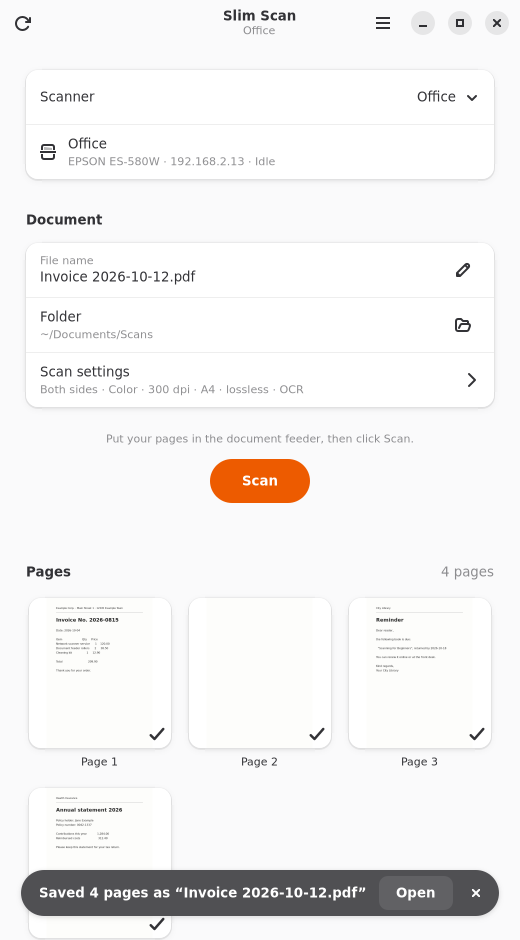
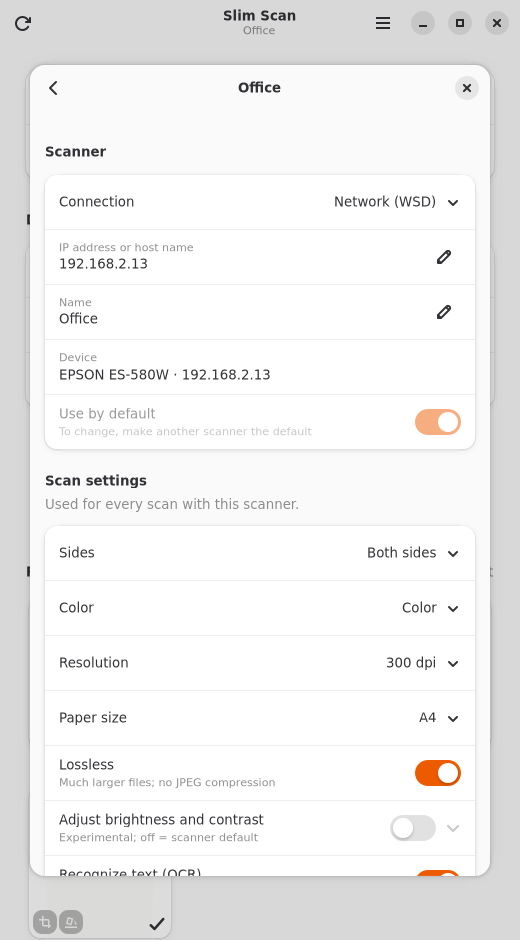
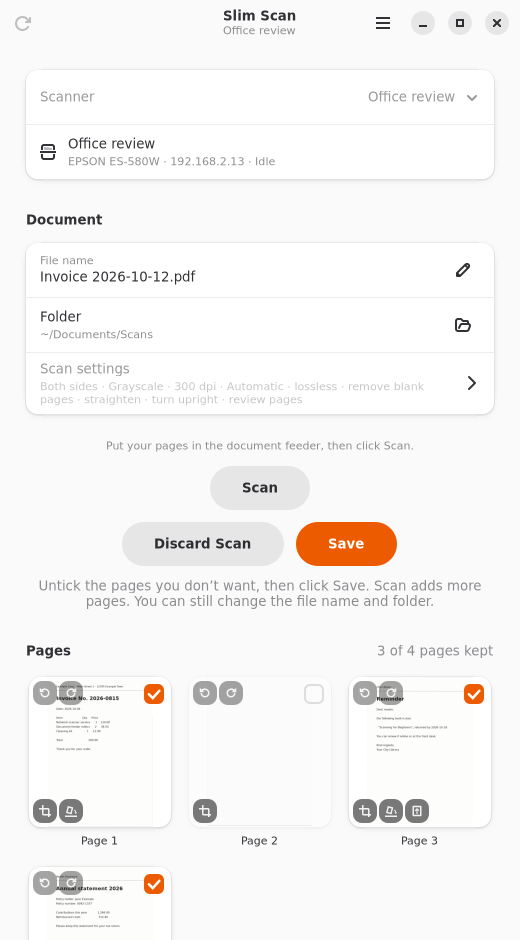
On day one the CLI also got a GTK 4 / libadwaita app (then called “Scan to PDF”) for GNOME, Ubuntu and KDE Plasma: a page preview with a counter while scanning, OCR progress per page, a status bar icon, start at login, notifications and the desktop’s own file dialogs via portals. Later it gained several scanners with their own settings, German translations, and a review step to drop pages before saving – or to scan more pages into the same document.
I also experimented with a small Nextcloud app that adds “Scan to PDF” to the + New menu in Files. The scanner is driven from the user’s own computer through a local helper, and the PDF goes to the open folder via WebDAV – so the Nextcloud server never has to reach the scanner. However the requirement for the local helper makes things a little unattractive in my opinion – but check it out for yourself.
Cleaning up the pages
Raw feeder scans need some work before they’re nice PDFs. Since the ES-580W refuses automatic paper size over WSD, all of this is done on the scanned image, for any scanner:
- Blank pages (
--skip-blank): each page is reduced to the average brightness of 8 × 8 pixel blocks; it is blank if hardly any block is clearly darker than the paper. Margins (feeder marks, filing holes) are ignored, show-through and dust count as blank, a lone page number doesn’t. When in doubt, a page is kept. - Paper size (
-p auto): scan the whole area and find the sheet, which is brighter than the feeder’s dark backing. Receipts, A5 and A4 can be mixed in one stack. By default only the left and right edges are cut – a sheet-fed scanner already knows where the sheet starts and ends. - Straightening (
--deskew) from the sheet’s edges, up to 20°. - Turning upright (
--auto-rotate) via Tesseract’s orientation detection. - OCR (
--ocr) with OCRmyPDF or Tesseract, languages picked automatically from what’s installed.
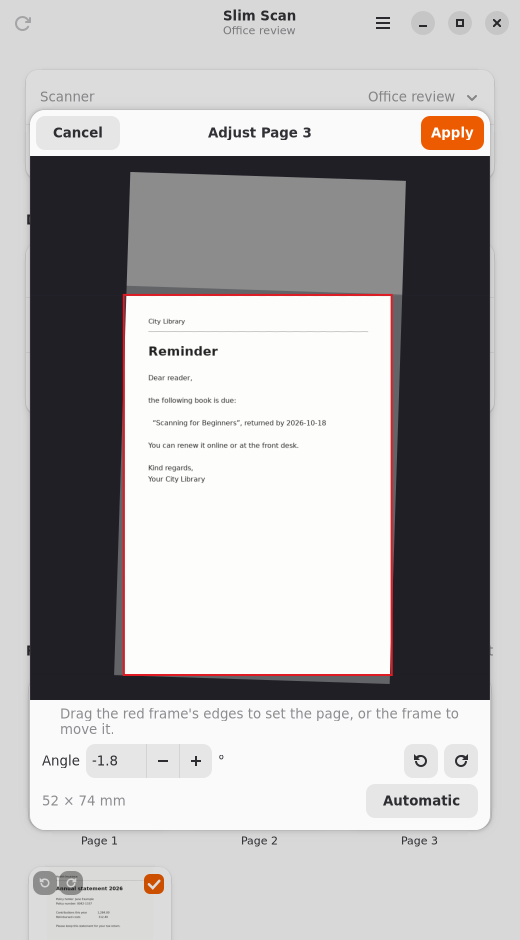
The scans themselves are never touched: the PDF places, turns and clips the original image, so nothing is re-compressed and the OCR text layer lines up with the corrected page. In the app each correction shows up as an icon on the page preview and can be switched off with a click; a double click opens a page editor where you drag the page edges and set the angle by hand.
The detection constants were tuned on real ES-580W scans: white paper on the dark front backing, the lighter rear backing, and – once SANE came into play – pages the scanner had already straightened itself, with white fill wedges around a tilted strip of backing. That last case took a few rounds.
Adding SANE – and finding two bugs in epsonds
WSD only gives you standard features. The scanner can do more – crop to the sheet and straighten in hardware – but refuses that over WSD. SANE’s epsonds backend lists both (--adf-crp, --adf-skew), so slim-scan got a second backend that drives scanimage. Everything after the scan (blank pages, OCR, PDF) stays the same, and it reaches USB scanners and any other SANE-supported device as a bonus.
Skew correction worked right away. Cropping didn’t: every page came back at the full feeder travel (2544 × 4642 px at 300 dpi, 8.5 × 15.5 in). Two bugs were in the way:
- The crop option gets reset.
setvalue()resetsOPT_ADF_CRPwhenever a geometry option is set, andscanimagealways setsbr-x/br-ylast – so#ADF…CRPis never sent to the scanner. This one already has a fix upstream: sane-backends MR !919 (not yet merged as of October 2026). - The ring buffer is too small. With MR !919 applied, mixed stacks failed:
eds_ring_write: ring buffer fullin the debug log,Application transferred too few scanlinesfromscanimage, and the next sheet stuck in the feeder (which looks exactly like a paper jam).sane_start()sizes the buffer from the previous page’s parameters – with cropping, every page has its own size, so a page larger than the one before it overflows.
The fix for the second one grows the ring in eds_decode_jpeg(), where the real page size is known and the buffer is still empty:
--- a/backend/epsonds-jpeg.c
+++ b/backend/epsonds-jpeg.c
@@ -143,6 +143,17 @@

 		int monoBufSize = (jpeg_cinfo.output_width + 7)/8;

+		/* With adf-crp every page has its own size; the ring was sized from
+		 * the previous page's parameters. It is still empty here: make room
+		 * for this page. */
+		SANE_Int needed = (needToConvertBW ? monoBufSize : bufSize) * (SANE_Int)jpeg_cinfo.output_height;
+		if (ringBuffer->fill == 0 && ringBuffer->size < needed) {
+			DBG(10, "%s: ring buffer grown from %d to %d bytes\n", __func__, ringBuffer->size, needed);
+			if (eds_ring_init(ringBuffer, needed) != SANE_STATUS_GOOD) {
+				DBG(1, "%s: out of memory for the ring buffer\n", __func__);
+			}
+		}
+
         JSAMPARRAY scanlines = (jpeg_cinfo.mem->alloc_sarray)((j_common_ptr)&jpeg_cinfo, JPOOL_IMAGE, bufSize, 1);
With both patches, an A6 card followed by an A4 sheet came back as 1750 × 1241 and 2486 × 3527 px, front and back – cropped by the scanner itself. I proposed the ring buffer fix in the MR !919 discussion rather than working around it in slim-scan; a Debian/Ubuntu sane-backends package rebuilt with both patches runs here now. slim-scan itself needed no special case: at connect time it probes whether the crop option survives, and pages the scanner already cut aren’t cut again.
Testing a patched backend doesn’t need root or a system SANE: unpack the distribution’s
libsane1,sane-utilsetc. withdpkg-deb -x, build onlyepsondsfrom the release tarball (./configure BACKENDS=epsonds), and pointLD_LIBRARY_PATH,SANE_CONFIG_DIRandPATHat it. And teeSANE_DEBUG_EPSONDS=20to a file – otherwise the one log you need is gone.
Security: WSD trusts everybody
WSD has no authentication at all – any device on the network can answer discovery and claim to be a scanner – and the ES-580W serves WSD only over plain HTTP. A review pass hardened the client against malicious or broken devices: device URLs are pinned to the host that answered, only HTTP(S) and no redirects or proxies, size/page/time limits per job, no XML with a DTD, image headers validated against the actual data before allocating anything, control and bidi characters stripped from device texts, and PDFs written via a temp file so a symlink planted in a shared folder is never written through. For the connection itself, the scanner’s own IP filtering and IPsec are the tools; the README documents how to set them up.
Testing without a scanner on the desk
Around 300 tests run in well under a minute, standard library only. They rely on fakes: a configurable fake WSD scanner (real UDP discovery and SOAP on localhost), a fake scanimage with the real option lists of the ES-580W’s epsonds and airscan backends, and fake OCR tools. Empty feeders, paper jams, busy scanners and crafted TIFF/JPEG headers are all covered. Whenever the real scanner surprised us, the new behavior went into the fake device profile together with a test. The GTK app has its own tests, and the README screenshots are regenerated by a script in a headless Weston session – the sample pages in them are generated, not real documents.
From wsdscan to slim-scan
The project started as wsdscan. Once SANE was a full second backend, the name was simply wrong, so on 12 October it became slim-scan (the app: Slim Scan, io.github.linuxrrze.SlimScan) – a clean break without compatibility aliases. It’s AGPL-3.0-or-later and on GitHub.
Take-aways
- No AirScan doesn’t mean no network scanning on Linux: WSD is plain SOAP over HTTP and very doable with just the Python standard library.
- Do the image clean-up on the scan, not in the scanner, and you get it for every scanner and protocol. Use the hardware where it works, and don’t do the same correction twice.
- If a driver option silently does nothing, read the backend source – here it was two separate bugs stacked on top of each other. Fix them upstream instead of papering over them.
- A “paper jam” in the middle of a batch may just be the backend aborting while the scanner still holds the next sheet.
- A fake device that models the real one’s quirks makes a hardware project testable – and keeps every surprise from the real device as a regression test.