
Zoom offers a .deb for Debian and Ubuntu, but no APT repository. Installing it once is easy, keeping it current is not: every update means another trip to the download page. A few years ago I found a github repo, that already did most of what I needed. I forked the repo and added some things there: a cron script that downloads each new release and builds a small repository on my own web server. After I learned some things about GitHub Actions I decided to add a second mode: building the repository index GitHub Actions and serving it from GitHub Pages, while the packages themselves never leave Zoom’s servers.
This post explains both modes, shows where each file lives, and walks through setting up the GitHub-hosted version on a Debian or Ubuntu machine.
Two modes, one goal
- Self-hosted (local) mode:
zoom-update.cronruns hourly on your server, downloads every new Zoom release, checks its signature and builds a flat repository next to the packages. Any web server publishes that folder. You keep a full copy of every package. - GitHub-hosted mode: a daily GitHub Actions workflow finds new releases, checks them and publishes a signed index on GitHub Pages. apt reads the index from GitHub and downloads the
.debdirectly fromcdn.zoom.us. Nobody has to run a server, and nobody redistributes Zoom’s 300 MB packages.
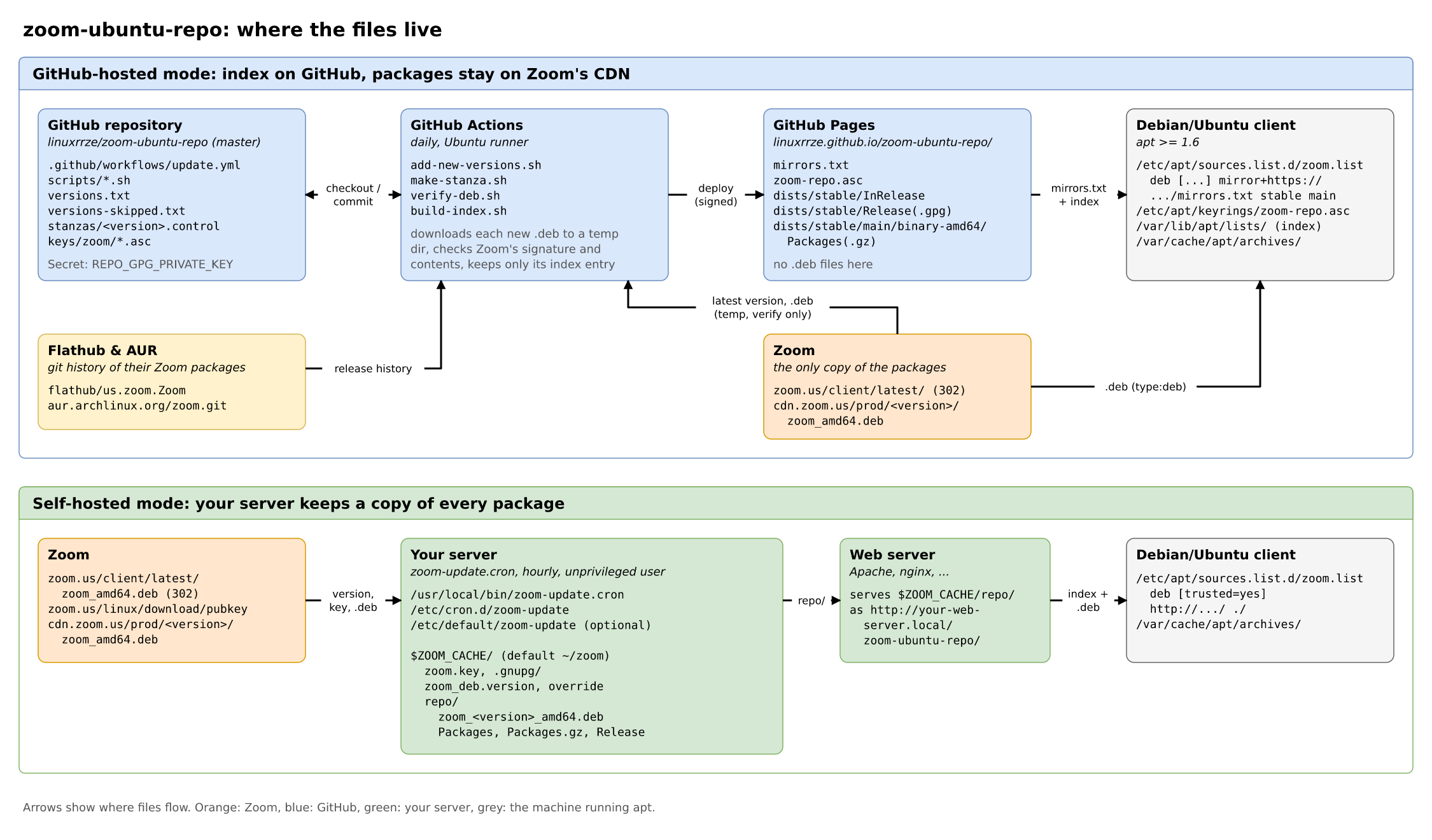
docs/.Where do new versions come from?
Zoom doesn’t publish a list of its Linux releases in any machine-readable form. What it does have is a stable “latest” URL that redirects to the current version:
$ curl -sI https://zoom.us/client/latest/zoom_amd64.deb | grep -i ^location
location: https://cdn.zoom.us/prod/7.2.1.5760/zoom_amd64.deb
Both modes start there. Checking only the latest version has a gap, though: if Zoom ships two releases between two checks, the first one is never seen. The GitHub workflow therefore also reads the git history of two other packagers, the Flathub package us.zoom.Zoom and the Arch AUR package zoom. Both record every release with its full build number. Every version they know that is newer than the oldest published one, and not published yet, becomes a candidate.
Checking Zoom’s signature, properly
Zoom signs its packages with dpkg-sig: the .deb contains an extra archive member _gpgbuilder, a clear-signed list of MD5 and SHA1 hashes of the other members (debian-binary, control.tar.xz, data.tar.xz).
Both modes use the same check (scripts/verify-deb.sh, and an inline copy in the cron script): extract _gpgbuilder, verify it with Zoom’s keys, then recompute size, MD5 and SHA1 of every member and compare them with the signed list. A tampered test package is rejected.
Zoom has rotated its signing key several times, so the GitHub mode keeps all of them in keys/zoom/. While publishing the newest ten versions I needed three of them: the 2022 key for 6.x up to 6.3, a 2025 key for 6.6.11 to 6.7.2, and the current key for everything since 6.7.5. Two lessons from collecting them: keyservers like keys.openpgp.org strip the user ID from unverified keys, and gpg refuses to import a key without one. Zoom still serves older keys itself, for example at https://zoom.us/linux/download/pubkey?version=6-3-10. And one release, 6.3.0.5519, has no signature at all; it’s on a skip list.
Self-hosted mode
The original mode is a single shell script, meant to be copied to /usr/local/bin and run by cron as an unprivileged user. Everything lives below $ZOOM_CACHE (default ~/zoom, configurable in /etc/default/zoom-update):
$ZOOM_CACHE/
  zoom.key             # Zoom's public key, from zoom.us/linux/download/pubkey
  .gnupg/              # keyring used for the signature check
  zoom_deb.version     # versions seen so far
  override             # dpkg-scanpackages override (priority, section)
  repo/                # publish this folder with any web server
    zoom_6.7.5.6891_amd64.deb
    zoom_7.2.1.5760_amd64.deb
    Packages
    Packages.gz
    Release
Each run asks the “latest” URL for the current version. If it’s new, the script downloads exactly that version from cdn.zoom.us/prod/<version>/ to a temporary file, checks it, and only then moves it into repo/ and rebuilds the index. If Zoom changes its key, the script stops until you have looked at the new key. Installation:
sudo cp zoom-update.cron /usr/local/bin/zoom-update.cron
echo '0 * * * * nobody /usr/local/bin/zoom-update.cron' | sudo tee /etc/cron.d/zoom-update
Clients point at your web server. The repository is a flat one with an unsigned Release file, so it needs trusted=yes, which is fine inside your own network:
deb [trusted=yes] http://your-web-server.local/zoom-ubuntu-repo/ ./GitHub-hosted mode
The goal for this mode was to keep the whole repository on GitHub but leave the packages on Zoom’s server. My first idea was a redirect: GitHub serves the index, and any request for a .deb gets a 302 to cdn.zoom.us. However that doesn’t work as GitHub Pages can’t send HTTP redirects for chosen paths, and the Filename: field in an APT index must be a path relative to the repository URL, so it can’t point to another host either.
The trick: apt’s mirror method
Since version 1.6 apt has a mirror+ transport. Instead of a repository URL, the sources entry names a list of mirrors, and each mirror can be limited to certain file types. The repository publishes this mirrors.txt:
https://linuxrrze.github.io/zoom-ubuntu-repo/    type:index
https://cdn.zoom.us/                             type:deb
apt fetches InRelease and Packages from the first entry and every .deb from the second. The index lists each package as Filename: prod/7.2.1.5760/zoom_amd64.deb, which apt appends to https://cdn.zoom.us/: exactly Zoom’s own download URL. In the debug log of a test run, the index requests went only to GitHub and the package request went only to Zoom.
What GitHub Actions does
add-new-versions.shcollects candidates from the “latest” redirect and from Flathub/AUR.make-stanza.shdownloads each new.debto a temporary directory on the runner, checks it withverify-deb.sh, and keeps only its index entry (stanzas/<version>.control, about 20 lines). The package itself is discarded. The new entries are committed to the repository.build-index.shcombines the entries intoPackages, writesReleaseand signs it with the repository key, which is stored as an Actions secret.- The result is deployed to GitHub Pages.
The signed index contains the SHA256 of every package as it was when it passed the check. apt compares every download from the CDN against it, so a file that changes on Zoom’s side later is rejected with “Hash Sum mismatch”. I tested that with a deliberately broken index.
Some details that make it run unattended: a version is recorded only after it passed the check, so failures are retried the next day. A failure for Zoom’s own latest version (typical cause: a new signing key) fails the run, failures for versions found via Flathub/AUR only show up as warnings. And because GitHub disables scheduled workflows after 60 days without repository activity, the workflow pushes an empty keepalive commit after 50 quiet days. Zoom sometimes takes that long between releases.
Setting up the GitHub version on Debian/Ubuntu
You need apt 1.6 or newer, which means Ubuntu 18.04 or Debian 10 and later, on amd64 (Zoom doesn’t publish Linux packages for other architectures).
1. Add the repository key
$ sudo install -d -m 0755 /etc/apt/keyrings
$ sudo wget -O /etc/apt/keyrings/zoom-repo.asc https://linuxrrze.github.io/zoom-ubuntu-repo/zoom-repo.asc
Check the fingerprint before trusting it:
$ gpg --show-keys /etc/apt/keyrings/zoom-repo.asc
pub   ed25519 2026-10-19 [SC] [expires: 2031-10-18]
      11C834440F15B1AFF6567534A6FEE25BF439A5B9
...
On Ubuntu 18.04, whose gpg doesn’t know --show-keys, use gpg --with-fingerprint /etc/apt/keyrings/zoom-repo.asc.
2. Add the sources entry
$ echo "deb [arch=amd64 signed-by=/etc/apt/keyrings/zoom-repo.asc] mirror+https://linuxrrze.github.io/zoom-ubuntu-repo/mirrors.txt stable main" \
    | sudo tee /etc/apt/sources.list.d/zoom.list
The mirror+ prefix is the important part: it tells apt to read the mirror list instead of treating the URL as a repository.
3. Install Zoom
$ sudo apt update
$ sudo apt install zoom
apt update should show the mirror list and the index coming from linuxrrze.github.io, and apt install the package coming from cdn.zoom.us. If Zoom was installed manually from a downloaded .deb before, nothing else is needed: from now on apt upgrade keeps it current.
Older versions, holding, removal
The repository started with the ten newest Zoom releases, and new ones are added while old ones stay. That helps when a new release breaks something:
# all available versions
$ apt list -a zoom
# a specific version
$ sudo apt install zoom=7.0.5.3034
# stay there (apt-mark unhold zoom to undo)
$ sudo apt-mark hold zoom
To remove everything again:
$ sudo apt remove zoom
$ sudo rm /etc/apt/sources.list.d/zoom.list /etc/apt/keyrings/zoom-repo.asc
$ sudo apt update
Running your own copy
If you’d rather not depend on my GitHub account, fork the repository. Under Settings → Pages, set the source to GitHub Actions. Then create a signing key without passphrase on your Debian/Ubuntu machine, in a temporary GnuPG home outside the checkout so the private key can’t end up in a commit:
$ export GNUPGHOME=$(mktemp -d)
$ gpg --batch --passphrase '' --quick-gen-key "Zoom apt repository <you@example.org>" ed25519 sign 5y
$ gpg --armor --export-secret-keys > "$GNUPGHOME/private.asc"
Store the content of private.asc as the Actions secret REPO_GPG_PRIVATE_KEY, keep an offline backup, and delete the temporary directory. Start the “Update repository” workflow once from the Actions tab. It publishes everything to https://<user>.github.io/<repository>/; use that URL and your key’s fingerprint in the steps above.
Which mode should you use?
| Self-hosted | GitHub-hosted | |
|---|---|---|
| Runs on | Your server (cron + web server) | GitHub Actions and Pages |
| Where the .deb files are | Copied to your server | Only on cdn.zoom.us |
| Index signed | No (trusted=yes) | Yes, plus SHA256 of every package |
| Catches releases between two checks | No | Yes, via Flathub/AUR history |
| Works if Zoom’s CDN is unreachable | Yes | No |
| Client requirement | Any apt | apt ≥ 1.6 |
For a single machine or a handful of desktops, the GitHub-hosted repository is the easy choice: three commands and it updates itself. The self-hosted mode is still there for networks that want a local copy of every package, or machines that can’t reach the internet directly. Both are in the same repository on GitHub.