
For a few weeks now Claude Code has been writing drafts, tagging posts and fixing typos on this blog through MCP. Along the way three plugins with “AI” or “MCP” in their name ended up on my wordpress instance: MCP Adapter, Enable Abilities for MCP and the official AI plugin. When I wanted to add a feature (uploading images from my local disk), I first had to answer a simple question: which of them does what, and which do I actually need?
Two directions, one shared registry
WordPress has split “AI” into separate building blocks. It helps to separate two directions:
- An outside AI operates WordPress. An agent like Claude Code, Cursor or opencode calls functions on the site over the Model Context Protocol. WordPress doesn’t talk to any LLM here. It only executes.
- WordPress uses an AI. The site itself calls a model, for example to suggest alt text or an excerpt in the block editor. MCP isn’t involved at all.
Both directions share one piece: the Abilities API, in core since WordPress 6.9. An ability is a registered function with a name (namespace/name), a JSON schema for input and output, a permission callback and an execute callback. It’s the common description that both humans and machines can read.
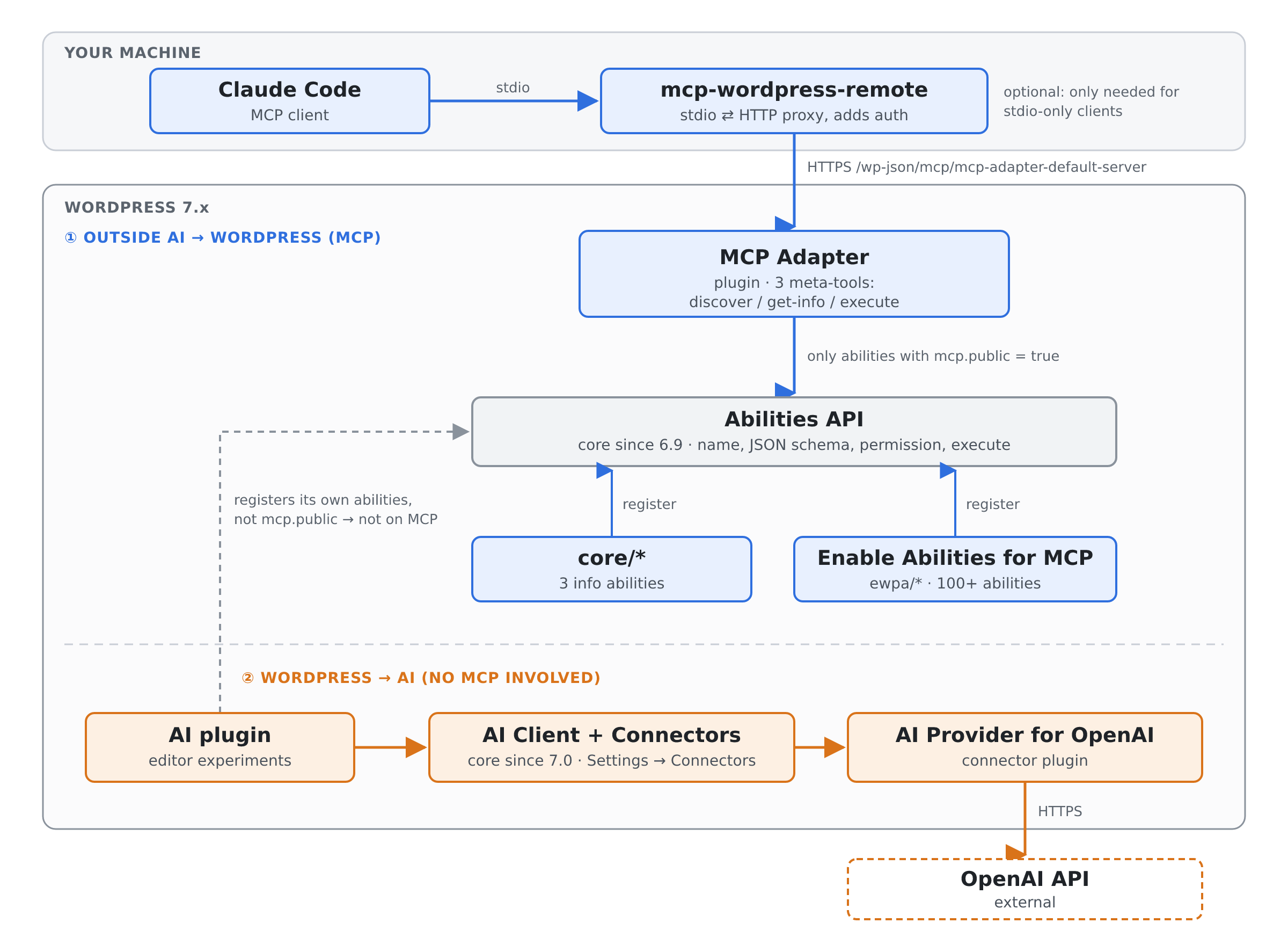
MCP Adapter: the protocol bridge
The MCP Adapter is the official plugin that turns abilities into MCP tools. It isn’t in core yet. Out of the box it registers one server at /wp-json/mcp/mcp-adapter-default-server, and the interesting detail is what that server offers. It doesn’t list every ability as its own tool. Instead it has exactly three meta-tools:
mcp-adapter-discover-abilities: what is there?mcp-adapter-get-ability-info: what does this one expect and return?mcp-adapter-execute-ability: run it with these parameters.
This keeps the tool list in the client short, no matter how many abilities the site has. Two rules matter. First, an ability is only visible if its metadata says mcp.public = true, and nothing is public by default. Second, authentication is plain WordPress REST auth (application passwords, OAuth, …), and each ability checks its own permissions with normal WordPress capabilities. Plugins can also register additional servers that expose a hand-picked set of abilities as regular MCP tools.
Installed on its own, though, the adapter is a bridge to almost nothing. Core only ships three informational abilities (core/get-site-info, core/get-user-info, core/get-environment-info).
Enable Abilities for MCP: the actual toolbox
This is where Enable Abilities for MCP comes in (on wordpress.org). It’s a third-party plugin that registers over a hundred abilities in the ewpa/ namespace and marks them public for MCP. They cover posts, pages and custom post types, categories and tags, comments, menus, post and term meta, media (listing, upload from URL, an alt-text audit), cache purging, and integrations for SEO plugins (Rank Math, Yoast, SEOPress), multilanguage plugins, WooCommerce, Elementor, JetEngine and more.
Every ability can be toggled under Settings → WP Abilities, and that also works for abilities other plugins register. The plugin also brings extra authentication options for the MCP routes: an OAuth 2.1 connector for claude.ai, a beta connector for ChatGPT, and a single admin bearer token. It needs the MCP Adapter. Older versions bundled a copy, but since 2.11.1 you install the adapter separately.
In practice, when Claude creates a draft on this blog, the call chain looks like this:
mcp-adapter-execute-ability
  ability_name: "ewpa/create-post"
  parameters:   { "title": "…", "content": "<!-- wp:paragraph -->…", "status": "draft" }

→ MCP Adapter checks auth, looks up the ability
→ Abilities API validates the input against the schema, runs permission_callback
→ EWPA's execute_callback calls wp_insert_post()
→ { "post_id": 2490, "status": "draft", … }
The AI plugin: AI inside the editor
The official AI plugin is the one that’s easiest to misread, and I misread it too. Despite the name, it’s not part of the MCP path. It’s the WordPress team’s collection of AI experiments for wp-admin and the block editor: alt-text generation, title, excerpt and slug suggestions, summaries, translation, image generation, comment moderation helpers, an Abilities Explorer, request logging and more. Each one is opt-in.
The plugin doesn’t include a model. Since WordPress 7.0, core ships an AI Client and a Settings → Connectors screen where provider credentials live centrally. Connector plugins such as AI Provider for OpenAI (or Anthropic, Google, or a local Ollama) plug into it, and the AI plugin uses whatever is configured there. The AI plugin also registers a few abilities of its own, but MCP integration is still marked “coming soon”. On my site none of them show up over MCP.
The client side: a proxy you may not need
Most setup guides, including the one I followed, configure the MCP client with npx @automattic/mcp-wordpress-remote. It’s a small stdio-to-HTTP proxy with no tools of its own. It forwards MCP messages to the adapter endpoint and adds authentication (application password, JWT or OAuth 2.1). Its README is refreshingly honest: if your client speaks HTTP MCP and can authenticate, connect it directly. Claude Code can:
claude mcp add --scope user --transport http wordpress \
  https://example.com/wp-json/mcp/mcp-adapter-default-server \
  --header "Authorization: Basic $(printf 'agent-user:xxxx xxxx xxxx xxxx' | base64 -w0)"
For older MCP setups: Automattic’s earlier wordpress-mcp plugin, which had its own MCP server, is archived. The MCP Adapter is its successor.
What do you actually need?
| Goal | Needed | Optional |
|---|---|---|
| An external agent edits content via MCP | WordPress ≥ 6.9, MCP Adapter, an ability provider (e.g. Enable Abilities for MCP) | mcp-wordpress-remote (only for stdio-only clients) |
| AI features inside the block editor | WordPress ≥ 7.0, AI plugin, one connector plugin | – |
| Both | All of the above. They don’t depend on each other. | – |
Things I cleaned up along the way
- Don’t let the agent be admin. Abilities respect WordPress capabilities, so give the agent its own user with the Editor or Author role and its own application password. That’s the cheapest way to limit what a confused or prompt-injected model can do.
- Switch off abilities for plugins you don’t run. I had about 35 SEO, multilanguage, JetEngine and Code Snippets abilities enabled for plugins that aren’t even installed. They add noise to every
discover-abilitiescall and attack surface for nothing. - One credential, one place. My Claude Code config had the same application password in the user scope and copied into five project scopes. The user scope is enough.
- Pin what runs with your credentials.
npx -y …@latestfetches whatever version is newest whenever the cache misses, and that process can see the password. Pin a version or drop the proxy.