MCP communication
MCP servers and clients can talk to each other in different technical ways:
| Type | Description | Transport | URL |
| stdio | In/output using stdio | stdio | |
| SSE | Server-Sent Events | Network (HTTP) | /sse |
| Streamable HTTP | Streamable HTTP | Network (HTTP) | /mcp |
Classic MCP
Alternative: mcpo (openapi.json)
Tools like openwebui prefer to use open APIs (like openapi) to achieve the same goal as MCP. The mcpo project therefore provides a MCP wrapper to export the MCP tools using the establisched openapi interface.
In order to make a standard stdio MCP available as openapi, you’d convert this call
linux # uvx mcp-email-server@latest stdiointo a config (with some additional settings) an run mcpo:
linux # cat mcpo.config
{
  "mcpServers": {
    "zerolib-email": {
      "command": "uvx",
      "args": ["mcp-email-server@latest", "stdio"],
      "env": {
        "LOG_LEVEL": "DEBUG"
      }
    }
  }
}
linux # mcpo --config mcpo.config
Starting MCP OpenAPI Proxy with config file: mcpo.config
2026-05-02 13:48:33,091 - INFO - Starting MCPO Server...
2026-05-02 13:48:33,091 - INFO -   Name: MCP OpenAPI Proxy
2026-05-02 13:48:33,091 - INFO -   Version: 1.0
2026-05-02 13:48:33,091 - INFO -   Description: Automatically generated API from MCP Tool Schemas
2026-05-02 13:48:33,091 - INFO -   Hostname: rainbow
2026-05-02 13:48:33,091 - INFO -   Port: 8000
2026-05-02 13:48:33,092 - INFO -   API Key: Not Provided
2026-05-02 13:48:33,092 - INFO -   CORS Allowed Origins: ['*']
2026-05-02 13:48:33,092 - INFO -   Path Prefix: /
2026-05-02 13:48:33,092 - INFO -   Root Path:
2026-05-02 13:48:33,092 - INFO - Loading MCP server configurations from: mcpo.config
2026-05-02 13:48:33,092 - INFO - Configuring MCP Servers:
2026-05-02 13:48:33,092 - INFO - Uvicorn server starting...
INFO:     Started server process [109280]
INFO:     Waiting for application startup.
2026-05-02 13:48:33,098 - INFO - Initiating connection for server: 'zerolib-email'...
[05/02/26 13:48:33] INFO     Processing request of type ListToolsRequest                                                                                                                                                         server.py:727
2026-05-02 13:48:33,657 - INFO - Successfully connected to 'zerolib-email'.
2026-05-02 13:48:33,657 - INFO -
--- Server Startup Summary ---
2026-05-02 13:48:33,657 - INFO - Successfully connected to:
2026-05-02 13:48:33,657 - INFO -   - zerolib-email
2026-05-02 13:48:33,657 - INFO - --------------------------

INFO:     Application startup complete.
INFO:     Uvicorn running on http://0.0.0.0:8000 (Press CTRL+C to quit)
Tool listing can be downloaded using service/openapi.json url:
linux # curl http://localhost:8000/zerolib-email/openapi.json | jq
{
  "openapi": "3.1.0",
  "info": {
    "title": "email",
    "description": "email MCP Server",
    "version": "1.27.0"
  },
  "paths": {
    "/list_available_accounts": {
      "post": {
        "summary": "List Available Accounts",
        "description": "List all configured email accounts with masked credentials.",
        "operationId": "tool_list_available_accounts_post",
<...>
Debugging
Try #1: golang mcptools
First tools I stumbled upon to better debug the different MCP communication styles was mcptools:
linux # sudo apt install golang-go
linux # go install github.com/f/mcptools/cmd/mcptools@latest
linux # ~/go/bin/mcptools
Run the MCP service locally (no network, just stdio):
linux # ~/go/bin/mcptools tools uvx mcp-email-server@latest stdio
list_available_accounts
     List all configured email accounts with masked credentials.

add_email_account(email:)
     Add a new email account configuration to the settings.

list_emails_metadata(account_name:str, [answered:], [before:], [flagged:], [from_address:], [mailbox:str], [order:str], [page:int], [page_size:int], [seen:], [since:], [subject:], [to_address:])
     List email metadata (email_id, subject, sender, recipients, date) without body content. Returns email_id for use with get_emails_content.

get_emails_content(account_name:str, email_ids:str[], [mailbox:str])
     Get the full content (including body) of one or more emails by their email_id. Use list_emails_metadata first to get the email_id.

send_email(account_name:str, body:str, recipients:str[], subject:str, [attachments:], [bcc:], [cc:], [html:bool], [in_reply_to:], [references:])
     Send an email using the specified account. Supports replying to emails with proper threading when in_reply_to is provided.

delete_emails(account_name:str, email_ids:str[], [mailbox:str])
     Delete one or more emails by their email_id. Use list_emails_metadata first to get the email_id.

download_attachment(account_name:str, attachment_name:str, email_id:str, save_path:str, [mailbox:str])
     Download an email attachment and save it to the specified path. This feature must be explicitly enabled in settings (enable_attachment_download=true) due to security considerations.
And this is how it works for SSE:
linux # uvx mcp-email-server@latest sse &
linux # ~/go/bin/mcptools tools http://localhost:9557/sse
<... should give the same output as above ...>
The third communication style however did not work:
linux # uvx mcp-email-server@latest streamable-http
<...>
[05/02/26 13:31:57] INFO     Created new transport with session ID: 3f89e23dc48d4923b77d5f779420d28d                                                                                                            streamable_http_manager.py:255
INFO:     127.0.0.1:50256 - "GET /mcp HTTP/1.1" 400 Bad Request
<...>

linux # ~/go/bin/mcptools tools http://localhost:9557/mcp
Error: unexpected status code: 400
Example: mcp tools npx -y @modelcontextprotocol/server-filesystem ~
No matter what I tried, I couldn’t make streamable-http work. According to some research streamable-http requires a session ID header to be present and will result in error 400 if it is missing. I didn’t investigate further, but maybe mcptools just doesn’t handle sessions?
Try #2: MCP inspector
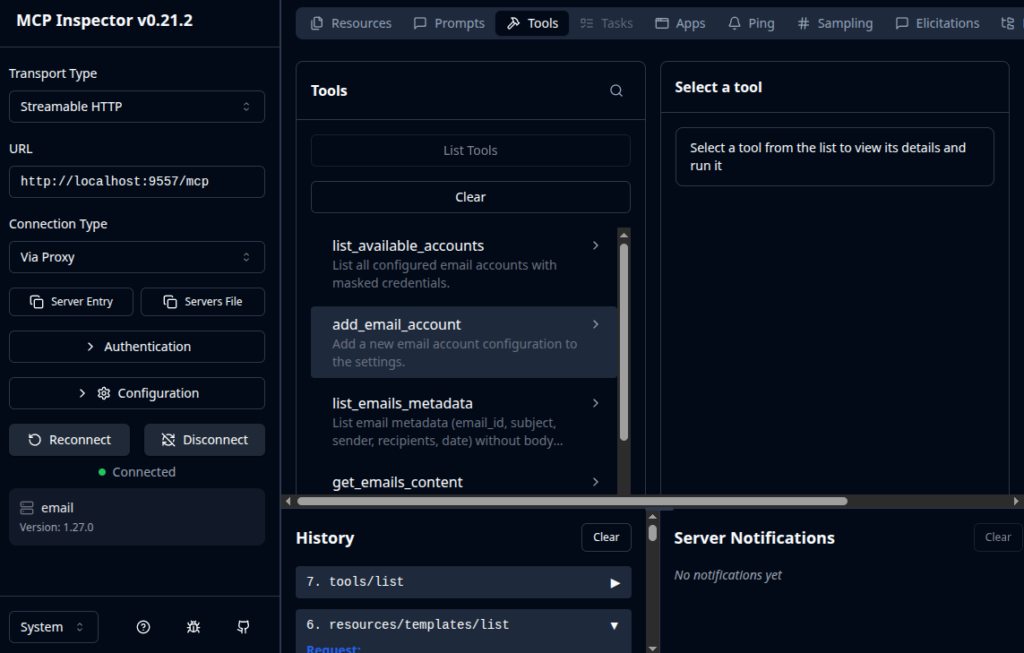
As I couldn’t make mcptools work with streamable-http, I found MCP inspector to handle situations better. Installing it will open up a browser windows where you can connect to your MCP servers.
linux # npx @modelcontextprotocol/inspectorMCP inspector handled SSE and streamable-http – only thing I had to change was the “Connection Type” setting from “Direct” to “Via Proxy“.